Thin, pale monospace in Chrome: a Powerline font config was vetoing every good mono font
 william 收录于 Linux
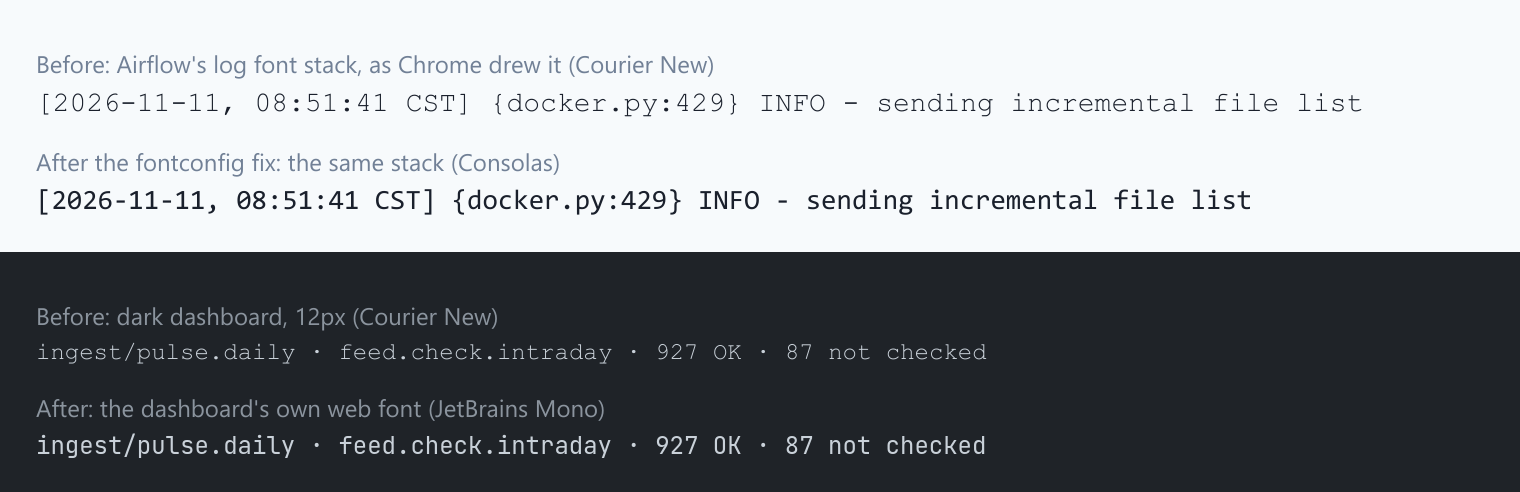
Two pages I look at every day had the same problem: monospace text that was too thin and pale to read comfortably. One was the log viewer in our Airflow 2.7 web UI, the other the dark theme of an internal Tabler dashboard. In both, Chrome was drawing the text in Courier New, a hairline font, even though both pages list four or five better fonts before it.
The cause was a fontconfig file from the fonts-powerline package, installed in
2019. It puts the symbols-only “PowerlineSymbols” font in front of most
monospace families, and Chrome then refuses every one of them. A one-rule
fontconfig file fixed it.

The setup
- Linux Mint 20.3, Google Chrome 129.0.6668.100, fontconfig 2.13.1
fonts-powerline2.7-3 (for the terminal’s status line) and the Microsoft core fonts (which bring Courier New)- Two pages with the same symptom:
- Airflow 2.7.3’s log viewer. Its Chakra UI theme asks for
SFMono-Regular,Menlo,Monaco,Consolas,"Liberation Mono","Courier New",monospace. - A Tabler 1.6 dashboard. Tabler’s
--tblr-font-monospaceisui-monospace,SFMono-Regular,Menlo,Monaco,Consolas,Liberation Mono,Courier New,monospace.
- Airflow 2.7.3’s log viewer. Its Chakra UI theme asks for
Step 1: ask Chrome which font it actually used
fc-match is not the answer to “what does Chrome draw”. It said every font in
the list was there:
|
|
|
|
Chrome can tell you what it really used. In DevTools, the Computed tab lists
“Rendered Fonts” at the bottom. From a script, the DevTools protocol call
CSS.getPlatformFontsForNode gives the same answer. For the dashboard’s
monospace text it said:
|
|
I then gave each candidate font its own line of text and asked again:
font-family asked for |
Chrome drew it in |
|---|---|
Consolas |
Times New Roman |
Liberation Mono |
Times New Roman |
DejaVu Sans Mono |
Times New Roman |
monospace |
Times New Roman |
JetBrains Mono |
JetBrains Mono |
SF Mono |
SF Mono |
Fira Code |
Fira Code Medium |
All of these are installed, and fontconfig finds every one. Chrome treated half of them as missing. With Menlo, Monaco, Consolas and Liberation Mono all “missing”, the first name left in either stack is Courier New.
Step 2: fix the page I own
For the dashboard I don’t have to depend on what each computer has installed. It
now ships its own font: JetBrains Mono from @fontsource (regular and bold,
264 KB including every script subset; the browser downloads only the subsets a
page uses), placed first in the stack:
|
|
One detail that matters: the dashboard’s “export as picture” button draws through an SVG, which can’t load web fonts, so the font has to be embedded by hand. The code that works out which fonts to embed was reading the computed font of a detached copy of the card, which has none, so the picture dropped back to a fallback font. Working out the fonts after the copy is attached fixed it.
That fixes one site. Airflow is someone else’s bundle, and the real problem is in Chrome on this machine.
Step 3: wrong turns in fontconfig
Hide Courier New
A user-level <rejectfont> for the Microsoft Courier New files. If Courier New
is gone, the stack should land on Liberation Mono. It didn’t: Chrome drew the log
line in Times New Roman, a proportional serif. That was worse, so I removed
the rule. It was also the first hint that Chrome couldn’t use Liberation Mono at
all:

Teach JetBrains Mono to answer to “Menlo”
Chrome does use JetBrains Mono, and both stacks name Menlo early. So I gave
JetBrains Mono a second family name, “Menlo”, with a <match target="scan">
rule. That had no effect on the system copy, because system font folders are
cached by root and a user scan rule never reaches them. On copies in
~/.local/share/fonts, fc-match Menlo did return JetBrains Mono, but Chrome
still drew Courier New. That stayed true even with “Menlo” listed first. That
looked like nonsense at the time; Step 4 explains it.
WOFF files in the font folder
Some of the debug output pointed at Source Code Pro .woff files in
~/.local/share/fonts. Rejecting every *.woff and *.woff2 changed nothing.
Step 4: watch Chrome’s own fontconfig queries
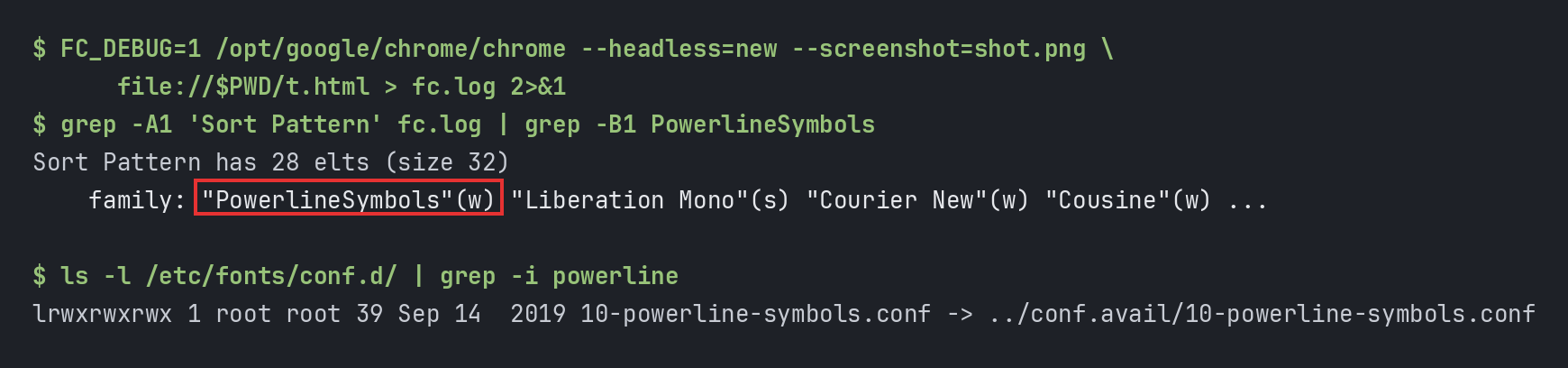
fontconfig prints every query it handles when FC_DEBUG=1 is set. Chrome uses
the system libfontconfig.so.1, so this works on Chrome too. The test page,
t.html, has one line each in 'Liberation Mono', 'DejaVu Sans Mono',
monospace and 'Courier New':
|
|
|
|
Chrome asked for Liberation Mono, but by the time the query reaches fontconfig’s
sort, PowerlineSymbols is in front of it. Something in the config was
prepending it:
|
|
|
|
/etc/fonts/conf.avail/10-powerline-symbols.conf (from fonts-powerline) is 25
of these:
|
|
one each for monospace, Droid Sans Mono, DejaVu Sans Mono, Inconsolata, Lucida
Console, Monaco, Menlo, Source Code Pro, Consolas, Bitstream Vera Sans
Mono, Liberation Mono, Ubuntu Mono, the Meslo variants and a few more.
Why Chrome ends up on Courier New
The idea behind the file is fallback: if your terminal font lacks the Powerline
arrow glyphs, take them from PowerlineSymbols. Terminals build a chain of fonts,
so it works there. But <prefer> puts PowerlineSymbols first, and the best
match fontconfig returns is then a symbols-only font, not the one asked for.
As far as I can tell from how it behaves, Chrome checks that the family it gets back is the family it asked for. When it isn’t, Chrome acts as if the font isn’t installed and moves to the next name in the CSS list. That explains every row of the Step 1 table:
| Font | In the Powerline list? | Chrome |
|---|---|---|
Menlo, Monaco, Consolas, Liberation Mono, DejaVu Sans Mono, monospace |
yes | dropped |
| Courier New | no | used |
| JetBrains Mono, SF Mono, Fira Code | no | used |
It also explains the “Menlo” attempt in Step 3: Menlo is in the list, so a font named Menlo got PowerlineSymbols put in front of it too.
So for both stacks, every font up to Courier New was vetoed, and Courier New won. Nothing else showed the problem. Terminals use their own font lists, fc-match reports the right font, and other browsers’ and toolkits’ matching differ.
The fix
Remove the link (the package keeps the file in conf.avail, so reinstalling can
bring the link back):
|
|
Or, without sudo, undo it for your user. User config is loaded later
(50-user.conf), so a rule there can delete PowerlineSymbols from every request
again. I keep this one as well, in case a package upgrade restores the link.
~/.config/fontconfig/conf.d/60-chrome-mono-powerline.conf:
|
|
A few details that matter:
-
Chrome reads fontconfig once, at startup. Closing a window isn’t enough: quit it completely (Ctrl+Shift+Q) and reopen it.
-
A quick check before and after: paste this into the address bar. When the fix is active, the first line is clearly heavier than the second.
1data:text/html,<div style="font:20px Menlo,'Courier New'">Menlo 0O1l [docker.py:429] INFO</div><div style="font:20px 'Courier New'">Courier 0O1l [docker.py:429] INFO</div> -
Check
chrome://settings/fontstoo. My Fixed-width font was set toJetBrainsMonoNL Nerd Font Propo, which is a proportional variant, so anything styled as plainmonospacewas not monospaced. I set it to JetBrains Mono.
Results
From CSS.getPlatformFontsForNode in a fresh Chrome process (same binary, same
user):
| Text | Before | After |
|---|---|---|
| Airflow’s log stack | Courier New | Consolas |
| Tabler’s stack | Courier New | Consolas |
| The dashboard (own web font) | Courier New | JetBrains Mono |
One thing I didn’t settle: in a fresh headless profile, plain monospace still
came out as Times New Roman after the fix. A fresh profile has no fixed-width
font chosen, so this may be a headless default. In my real profile the
fixed-width setting above covers it.
Takeaways
fc-matchis not what the browser does. It reported the right font for every name, while Chrome dropped half of them. Ask Chrome itself: DevTools' Rendered Fonts, orCSS.getPlatformFontsForNode.FC_DEBUG=1works on any program that uses fontconfig, Chrome included. The “Sort Pattern” lines show the request after every config file has rewritten it. That is where the bad family showed up.<prefer>is not “fall back to”. It puts the font first. For a symbols-only font that’s wrong everywhere except a terminal.- If you control the page, ship the font. A font stack that only names system fonts looks different on every machine. A 264 KB web font removes the question.
- Don’t stack fixes you can’t explain. I tried three fontconfig changes that didn’t help, and removed each one before trying the next. In the end, one debug flag gave the answer.
References
- fontconfig user documentation,
<alias>,<prefer>,<match>andFC_DEBUG: https://www.freedesktop.org/software/fontconfig/fontconfig-user.html - The Powerline fonts config:
dpkg -L fonts-powerline,/etc/fonts/conf.avail/10-powerline-symbols.conf - Chrome DevTools Protocol,
CSS.getPlatformFontsForNode: https://chromedevtools.github.io/devtools-protocol/tot/CSS/#method-getPlatformFontsForNode
相关内容
- One night, one dead disk: an Airflow trading-host outage and what it taught me
- Codex startup: a shared model cache and a five-second timeout
- Fixing duplicated tmux status bars and missing icons in Termius on iPhone
- Profiling zsh: a Python plugin was adding 190 ms to every command
- tmux lag, round 2: every status-bar fork froze the server for 30 ms
 支付宝
 微信