
One night, one dead disk: an Airflow trading-host outage and what it taught me
 william 收录于 Linux
Update 2026-11-11: the “a restart is a procedure, not a command” advice below is now three scripts: a dated image built from the running container, a redeploy that refuses while tasks run and rolls back on failure, and a supervisor inside the container. See Rebuildable Airflow.
At 19:56 one evening, a 21.8 TB data disk on our Airflow host started throwing I/O errors. By 21:37 someone had pointed Docker at a fresh, empty data directory to get things running again. That one change, made under pressure and never written down, turned into five separate incidents by 09:30 the next morning: a message broker that vanished, a missing mount, concurrency limits back at their defaults, live-trading processes Airflow no longer knew about, and two restarts that orphaned every live trade.
Everything was back by 10:08. This post is the timeline, the root cause of each problem, how each was fixed (including the 1.5-minute outage I caused myself while fixing it), and what I would change so this can’t happen the same way again.
The setup
- One host runs Airflow 2.7.3 in a Docker container, using
LocalExecutorand a MySQL metadata DB. - Almost every task is a
DockerOperator. Through the host’s docker socket, Airflow starts a sibling container namedtask_<task_id>. Our in-house subclass,CleanStartDockerOperator, removes a stopped leftover container with that name before starting, and refuses to start if one is still running. - The trading DAG starts one live-trade task per account: 34 stock accounts plus 9 futures accounts. Each task holds its Airflow slot for the whole session, about 330 minutes.
- RabbitMQ also runs on the same host, as a container listening on 5672/15672.
- There is a
docker-compose.yamldescribing all of this. It is out of date; the Airflow container had been started by hand withdocker run.
For older notes on this setup, see airflow 运维, docker 安装 RabbitMQ and docker 更改存储目录. The last one describes exactly the knob that started all this.
What happened

In short:
| When (CST) | Event | Trading impact |
|---|---|---|
| Nov 10 19:56 | data disk I/O errors begin | none yet |
| Nov 10 21:37 | Docker switched to an empty data-root | old containers invisible |
| Nov 10 night | Airflow container rebuilt by hand, several times | config drift starts |
| Nov 11 00:25 | a manual DAG run starts 16 live-trade containers, then Airflow loses track of them | 16 accounts trading from a midnight process |
| 08:06–08:51 | yaml relink and pre-trading checks fail: no /data |
yaml symlinks still on yesterday’s files |
| 09:29 | RabbitMQ found missing | message clients can’t connect |
| 09:33 | only 16 of 34 live stock trades can start | 18 accounts not trading |
| 09:54 | someone runs docker restart airflow |
every trade orphaned |
| 10:03 | my re-adopted trades are killed by the scheduler | 43 accounts down ~1.5 min |
| 10:08 | stable | none |
Why it happened

The root cause is not “a disk failed”. Disks fail. The failure became an outage because the running system existed only as state inside Docker, not as a description anywhere:
- The Docker data-root held everything: container definitions, images, RabbitMQ’s data (no volume), and Airflow’s tuned
airflow.cfg, which lived in the container’s writable layer. Switching to an empty data-root deleted all of it in one move. - Airflow was rebuilt from memory with
docker run. Each rebuild dropped something: first the/sharedmount and a plugin (fixed the night before), then/data, then the concurrency settings, which nobody knew had been tuned. - Live-trading processes are Airflow tasks, and with
LocalExecutorevery task runner is a child of the scheduler. Any restart orphans every running trade. The duplicate guard inCleanStartDockerOperatorthen turns each orphan into afailedtask. - Several people were working on the same box at the same time, with no lock and no announcements.
The sections below take each problem in turn.
Problem 1: the yaml relink task couldn’t see /data
Symptom. The morning task that points the *.yaml symlinks at today’s model files failed at 08:06 and again at 08:51. The colos were still on yesterday’s files, 40 minutes before the open.

Cause. This task is a BashOperator, so unlike the DockerOperator tasks it runs inside the Airflow container. The old compose file mounts /data:/data. None of the containers rebuilt overnight did, so /data inside the container was the empty directory baked into the image.
Fix.
- Unblock trading first: I ran the task’s exact relinking logic on the host, where
/datais real. Then I marked the tasksuccessand cleared everything after it, so Airflow itself ran the rsync to the trading servers. All 73 tasks were green by 09:02. - Fix properly later: I added the mount when recreating the container at 09:58. The same missing mount had also failed three read-only
pretrading.*check DAGs, which passed once rerun at 10:12.
Problem 2: RabbitMQ “disappeared”
Symptom. docker ps -a showed no rabbitmq container at all, not even a stopped one, and no image either. Clients kept retrying against port 5672.

Cause. Nothing deleted it. At 21:37, /etc/docker/daemon.json gained "data-root": "/var/lib/docker-recovery" and dockerd was restarted. Every container and image created before that lives in the old root, so to the running daemon they don’t exist. I couldn’t prove where the old root lived without root access, but /var/lib/docker no longer exists and the failing disk is unreadable. Six br-* bridges left from the old daemon’s networks, all down, were the other clue.
Fix. I recreated the container with the same settings as the compose file, plus the thing it never had: a named volume for /var/lib/rabbitmq. Then I added the user that clients log in as.

My mistake: I passed the password through stdin, rabbitmqctl add_user u "$(cat)", but ran docker exec without -i. Stdin never reached the container, so the password was silently set to empty, and every login was refused for about a minute until I used change_password. Pass secrets as arguments or with -i, then check with a real login, as mqtest.py does above.
Everything the old instance held that clients don’t declare themselves is gone for good: queues, exchanges, bindings and extra users.
Problem 3: only 16 of 34 live trades could start
Symptom. At 09:40, a short pre-trade task had been sitting in scheduled since 09:38. On normal days it starts at about 09:33. Nothing was failing; it was just never picked up.

Cause. The original airflow.cfg raised parallelism (global) and max_active_tasks_per_dag well above the defaults. It lived in the container layer, so it was lost with the old data-root, and every rebuilt image shipped the defaults, 32 and 16. At 09:33 the first 16 live-trade tasks grabbed all 16 slots and held them, and each one runs for 5.5 hours. The other 18 accounts, and everything else in the DAG, would have waited until about 15:00.
Fix, in two steps because the second needs a restart:
- Without a restart: add
max_active_tasks = 128,to theDAG(...)call. The scheduler picked it up on its next parse at 09:47, and 11 more accounts started trading. The global limit of 32 then capped it at 27/34. The pre-trade task I was originally asked about I simply ran by hand withairflow tasks run ... --local -A, which bypasses the slot limit. - With a restart (09:58):
AIRFLOW__CORE__PARALLELISM=128andAIRFLOW__CORE__MAX_ACTIVE_TASKS_PER_DAG=128as environment variables, so the settings now live in the container definition instead of a file inside the image.
Problem 4: 16 accounts trading from a midnight process
Symptom. Some live-trade tasks kept failing with this, every time Airflow retried them:

When I joined task states against docker ps, there were two kinds of rows:

Cause. At 00:19 someone triggered the trading DAG by hand, probably to test the rebuilt Airflow. Its live-trade containers started at 00:25–00:28. The run then failed, Airflow stopped tracking them, and they kept trading: 7 stock and 9 futures accounts, on a process started nine hours before the open, possibly with targets from before that morning’s pre-trade step. Today’s tasks for those accounts couldn’t start because task_<id> was already taken.
Fix. Account by account: docker stop the old container, then start the task under today’s run:
|
|
Each account was offline for about 20 seconds; the new container logged today’s init_time. --local -A runs the task outside the executor, so it doesn’t need a free slot, yet Airflow still records it as running and keeps a heartbeat. Remember that last part, because problem 5 is about exactly that.
Problem 5: two restarts, and the kill I caused
09:54, a restart by someone else. While I was waiting for an answer about when to restart, someone opened a shell in the container and restarted it:

With LocalExecutor, the task runners died with the scheduler, but their trade containers kept running. The new scheduler retried the tasks, CleanStartDockerOperator refused each one, and all 34 stock trades were marked failed while still trading.
09:58, my recreate. Every trade was orphaned already, so I recreated the container right away with /data and the new limits. I stopped the old one with docker kill (SIGKILL), not docker stop. A graceful stop gives the task runners time to run DockerOperator.on_kill(), which stops the very containers I wanted to keep alive. At 10:01 I re-adopted all 46 orphans (34 stock, 9 futures, one fund task, two pulse tasks) using the problem 4 method.
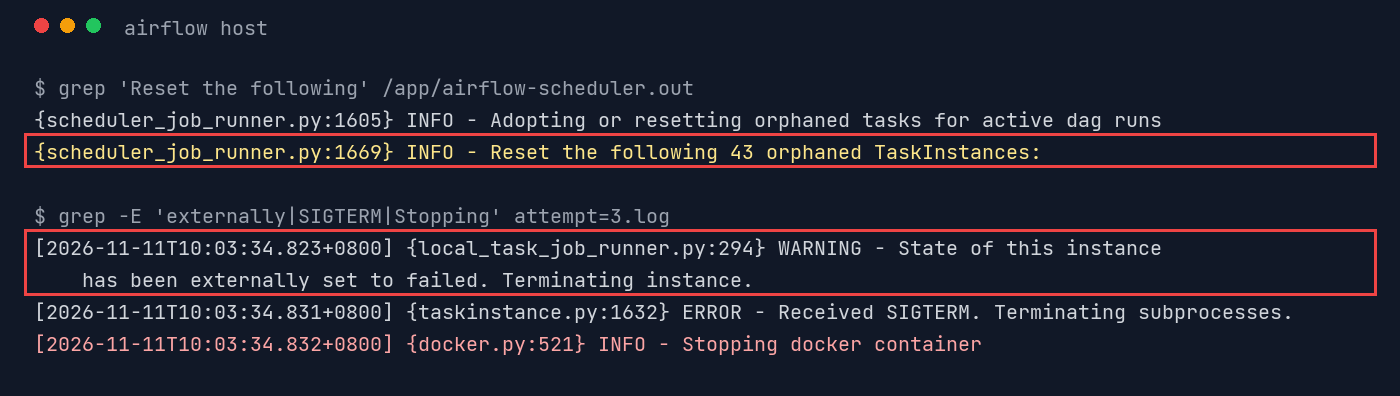
10:03, my re-adopt blew up. Five minutes later, every live-trade container got SIGTERM and was removed:


Here’s why. Every 5 minutes, the scheduler runs adopt_or_reset_orphaned_tasks, which selects running and queued task instances like this (Airflow 2.7, scheduler_job_runner.py):
|
|
airflow tasks run --local does not update queued_by_job_id. My 43 re-adopted tasks still pointed at the old container’s scheduler job, which the new scheduler had just marked failed. So at 10:03:25 (scheduler start 09:58:25 plus 300 s), the orphan check reset all 43 and queued new attempts. Each new attempt hit CleanStartDockerOperator, refused, and marked the task failed. My original attempt’s heartbeat saw “state externally set to failed”, sent itself SIGTERM, and on_kill() stopped the trade container. 43 accounts stopped trading at 10:03:40.
Fix.
- Restart all 43 at once: the same command as above. Everything was trading again at 10:05.
- Point the stragglers at the live scheduler: the re-queue at 10:03 had pointed those 43 at the live scheduler, which made them safe. The 3 tasks that were never reset still pointed at the dead one and would have been killed at 10:08:25, so I fixed them by hand:
|
|

The 10:08:25 check reset nothing, and all 34 stock and 9 futures trades stayed up. The trading DAG’s final task, which runs after all the live trades, had been knocked to upstream_failed twice; I cleared it again so it runs at the close.
What I fixed, in one table
| Problem | Root cause | Fix | Time |
|---|---|---|---|
| yaml relink fails | no /data mount after hand rebuild |
ran relink on host, cleared downstream; mount added at recreate | 08:57 / 09:58 |
| RabbitMQ missing | lived in the abandoned docker data-root | recreated with a named data volume + client user | 09:35 |
| 18 live trades queued | tuned airflow.cfg lost, defaults 16/32 |
max_active_tasks=128 in DAG, then env vars 128/128 |
09:47 / 09:58 |
| 16 stale live trades | midnight manual run, containers outlived Airflow’s tracking | stop + tasks run --local -A under today’s run |
09:50–10:01 |
| everything orphaned | docker restart mid-session; LocalExecutor |
recreate, re-adopt 46 tasks | 10:01 |
| 43 trades killed (mine) | manual runs keep a dead queued_by_job_id |
restart all, repoint stragglers to live scheduler | 10:05 / 10:06 |
How to improve: the cheap things first
1. One file describes the host, and CI checks it
The fastest fix to every “the rebuilt container is missing X” problem is to stop rebuilding from memory. Put the real Airflow service in the compose file, with every setting as an environment variable instead of in a file inside the image:
|
|
Then add a drift check, run from cron or CI, that fails loudly when the live container stops matching:
|
|
The compose file also held plaintext passwords, and the base image keeps a registry password in its shell history. Both belong in a root-only env file.
2. Stateful services get volumes, and their config gets exported
RabbitMQ is easy: use a named volume, and keep a definitions export in git so a fresh broker comes back with its users, vhosts and queues:
|
|
3. Watch the disk, and keep docker’s root off it
dmesg had I/O errors from 19:56, ninety minutes before anyone touched Docker. A tiny check like dmesg -T --level=err | grep -c 'I/O error' feeding the existing WeChat alert would have turned a midnight scramble into a planned move. Keep the docker data-root on the SSD with the OS, not on a big data array. And whenever the data-root changes, write it down: a one-line note in the host’s README would have saved me an hour.
4. A restart is a procedure, not a command
Most of the trading impact came from restarts, including mine. So:
- Freeze 09:00–15:00. Outside a real emergency, nobody restarts Airflow during the session. If you must, announce it in the ops channel first.
- Use a pre-restart script that refuses when live tasks are running, and lists them:
|
|
- Use a post-restart script that does what took me two tries: for each running container without a running task, stop it and
tasks run --local -A, then point every running or queued task at the live scheduler job (the snippet above). Run it immediately, not 5 minutes later. - Stop the old container with
docker kill. Graceful stops leton_kill()stop your trades.
5. Live trades must refuse to run from a manual run outside the session
The 00:25 containers came from a manual test of the trading DAG. A three-line guard in the live-trade operator would have stopped it:
|
|
Better solutions to the current design
The cheap fixes stop the same thing happening twice. The real problem is architectural: we use Airflow as a process supervisor for 43 five-hour trading processes. Airflow is good at “run this, then that, retry on failure”. It is bad at “keep this alive all day, across my own restarts”.

Option A: make the operator adopt its own container (smallest change)
CleanStartDockerOperator already finds the leftover container; it just gives up. Label each container with the run that owns it, and reattach when the label matches instead of refusing. Then any restart, and any orphan reset, becomes a non-event. An untested sketch:
|
|
With this, the stale 00:25 containers would have been stopped automatically (different owner label), and the 09:54 restart and the 10:03 reset would have simply reattached.
Option B: trading processes become services, Airflow becomes the conductor
Run each account’s trader as a long-lived service (compose with restart: unless-stopped, or systemd), started and stopped by short Airflow tasks, with a sensor in mode="reschedule" to watch its health. A reschedule-mode sensor gives its slot back between pokes, so the DAG no longer needs 43 slots for 5.5 hours, and a scheduler restart does nothing to the traders at all. This is the shape I’d go for.
Option C: a different executor
CeleryExecutor, with workers in their own containers, decouples task runners from the scheduler, so restarting the scheduler no longer kills them. It’s more moving parts (a broker, workers), and it doesn’t fix the “five-hour task in a slot” problem. I’d only do it alongside A or B.
Takeaways
- If you can’t rebuild it from a file, you don’t have it. Every lost setting here, including mounts, concurrency, RabbitMQ data and users, existed only inside Docker’s data-root.
- Write down emergency changes as you make them. “Switched data-root to
/var/lib/docker-recoverybecause sdb is dying” in a README would have answered the RabbitMQ question in one minute. - Duplicate guards need an adopt path. Refusing to start a second copy is right; marking the task
failedwhile the first copy is still trading is how a restart becomes an outage. - Verify the side effects of your own fix, on the timescale of the system’s background jobs. My re-adopt looked perfect at 10:02 and blew up at 10:03:25 because a 5-minute housekeeping loop hadn’t run yet. I now wait one full orphan-check interval before calling a restart done.
- One operator at a time during the session. Two people restarting and repairing the same container ten minutes apart is how 09:54 happened.
All account names, usernames, internal hostnames and addresses in the screenshots were replaced with placeholders (
ACCT_01,<team>,<user>,<client-1>). The values themselves are the real output.
相关内容
- docker buildx
- Docker 使用 systemctl
- Codex startup: a shared model cache and a five-second timeout
- Use the IDC proxy from XPS and Codex
- docker buildx: the builder had a proxy, the client didn't
 支付宝
 微信