
Rebuildable Airflow: snapshot the running container, redeploy with a rollback
 william 收录于 Linux
Update 2026-11-11 17:30: image tags are now the build time,
yyyymmddTHHMMSS(e.g.airflow:20261111T172041), so two builds on the same day no longer collide, and./run.shwith no tag lists what’s available. The outputs below are from the first build, which still used a plain date tag,20261111. The downloadable scripts are the current versions.
The outage postmortem had one recurring theme: every time someone rebuilt the Airflow container by hand, it came back missing something. A mount, the concurrency settings, the plugin, the registry login. The image was whatever someone last typed, and the settings that mattered lived only in a running container.
So the same afternoon I wrote three small scripts. build.airflow.sh turns the running container into an image tagged with its build time (airflow:20261111T172041), pushes it, and saves a tarball. run.sh recreates the container from that tag and checks it’s actually healthy, or puts the old one back. restart.sh runs inside the container and keeps the scheduler and webserver up. From the 170 entries in docker diff, the image keeps 13 files (172K). A redeploy is healthy about 15 s after the new container starts, and a failed one rolls back in 1 s.

The setup
- One host runs Airflow 2.7.3 in a single container: LocalExecutor, MySQL metadata DB, about 66 DAGs. Most tasks are
DockerOperators that start containers through the host’s docker socket. - The container needs five mounts or things break:
/app/dags,/app/logs,/shared(the trading calendar),/data, and/var/run/docker.sock. It also needs a read-only registry login. - Images live in a LAN registry,
192.168.1.162:5000/airflow. Before today the tags werev1.1,v1.2andv1.3, each made by hand the night before. - The host has
docker,jqandcurl, but nopython3. Inside the container it’s CentOS 7 with bash 4.2.
The scripts are in this post’s folder: build.airflow.sh, run.sh, restart.sh. Both host scripts run on the Airflow host itself, as the deploy user.

Why not just docker commit
My first thought was docker commit airflow airflow:20261111. Two things in the container made that a bad idea.
The container layer is mostly junk. docker diff airflow listed 170 entries: 92 of them were /tmp/manual_*.log files from the morning’s manual task runs. The rest included SSH agent sockets, a /tmp/root_*_access_token.conf, root’s .zsh_history, vim state, the scheduler’s 4.7 MB airflow-scheduler.out, and __pycache__. A commit would ship all of it, history included.
The env holds secrets. docker commit copies the container’s Config.Env into the image. Counting secret env vars per image:
|
|
|
|
v1.2 was itself a commit, so since last night anyone who could pull the image could read the DB password with docker inspect. I also checked docker history --no-trunc for the password and found 0 hits, so the secrets are only in the image config, not in a layer. That matters: a new image can override them.
A fair question while writing this: shouldn’t the snapshot skip /app/logs, since it’s large and irrelevant? It already does. /app/logs is a bind mount, and Docker never puts a mounted path into an image, whether by commit or build. The same goes for /app/dags, /shared, /data and the socket.
build.airflow.sh: keep what changed, drop the rest
Instead of committing, the script builds a normal image on top of the container’s own image, adding only the files the container really changed.
Which files
The script reads docker diff, then removes every mounted path (taken from .Mounts[].Destination) and a fixed list of noise. What survives goes into a tar, copied out of the container with docker exec tar:
|
|
A few details that matter:
-iondocker exec. Without it the file list never reaches tar’s stdin. The same mistake gave a RabbitMQ user an empty password that morning.--no-recursion.docker difflistsC /usr,C /usr/localand so on for every changed parent directory. With recursion, aC /usrentry would tar the whole of/usr.--ignore-failed-read. A file can vanish betweendiffandtar, for example a rotated log. That shouldn’t fail the build.- Deleted files (
Dentries) go intodeleted.txt, and the image runsxargs rm -rfon them.
On the live container this kept 13 entries, and the only real file changes were in /app/airflow.cfg. One was parallelism = 128. The other was an edit someone had made in vim at 10:59 that day, adding basic_auth to the API auth_backends. That one would have been lost on the next rebuild, because it existed nowhere else. This is the point of building from the container: hand edits made under pressure get carried forward instead of silently dropped.
The generated Dockerfile
|
|
- Non-secret runtime settings get baked in. These are
AIRFLOW__*variables the container had but its image didn’t. That’s how the two concurrency settings, lost twice the night before, become part of the image. - Secrets get blanked. Docker can’t unset an inherited
ENV, but it can override it with an empty value.run.shpasses the real values with--env-fileat runtime. After building, the script checks the new image’s env and fails if any secret variable still has a value. - The base is pinned. If the container’s tag has since moved to another image, the script tags the exact image the container runs as
base-TAG, so the snapshot is of what’s actually running.
Checks before anything leaves the host
The requirement is that whatever the build produces must work, because the next rebuild starts from it. So there are three gates, and nothing is pushed or saved unless all three pass:
- Source health. It refuses to build if the running container’s own
/healthdoesn’t report a healthy metadatabase and scheduler. A broken container never becomes the next base. - Static checks in a throwaway container. It mounts the real binds read-only, with no docker socket, and checks the airflow version, the concurrency values, that
restart.shis present, and that no registry login is in the image. It imports wepy’sCleanStartDockerOperatorand parses every DAG withDagBag: 66 DAGs, 0 import errors. - Boot test in a sandbox. It starts the image through its real entrypoint,
/app/restart.sh run, with sqlite, SequentialExecutor, an empty DAG folder, no mounts and no published ports, and requiresrestart.sh statusto pass. This can’t touch production.

One thing in the DagBag output made me stop and check: a CRITICAL line from a DAG’s check_cmd saying a model update had “failed”. DAG files run their top-level code at parse time, and this one is part of an alerting path. I read the source. check_cmd only logs and returns a shell string; the WeChat send is inside that string and only runs if the task runs. The production scheduler parses the same file every 30 seconds. Still, “parse all DAGs” is not free of side effects, and it’s worth checking what yours do at import.
Then it pushes to the registry and saves docker save | gzip to /data/docker-images/airflow/airflow-20261111.tar.gz, with a .sha256 next to it and mode 600. The newest 7 are kept.
restart.sh: a supervisor instead of & exec
The old entrypoint was:
|
|
The webserver is PID 1, so if it dies the container restarts. If the scheduler dies, nothing notices. The UI keeps working, and nothing gets scheduled. The 2023 version in airflow 运维 used airflow scheduler -D, which has its own trap when used in an entrypoint: python-daemon won’t detach when its parent is PID 1, so the command never gets past the first -D.
The new /app/restart.sh has three modes:
|
|
- The container runs with
--init.docker-initis PID 1, so zombies get reaped and signals reach the script. - The container’s bash is 4.2, which has no
wait -n. So the loop polls every 5 s withsleep 5 & wait $!rather than a plainsleep, so aSIGTERMorSIGHUPtrap fires immediately instead of after the sleep. - A service that dies within 60 s of starting gets a 30 s pause before the next start, so a broken config can’t spin.
docker exec airflow /app/restart.shwith no argument is how people restarted Airflow before, so I kept that meaning. It finds the supervisor (pid file plus a/proc/<pid>/cmdlinecheck, because the pid file survives container restarts) and sends itSIGHUP. It refuses while task instances are running or queued, because LocalExecutor task runners are children of the scheduler.
I tested it in a sandbox container: killed the scheduler with SIGKILL, restarted through docker exec, tried to start a second supervisor, and stopped the container.

run.sh: recreate from local, registry or tarball
|
|
Second-precision tags are tedious to type, so ./run.sh with no tag prints its usage and what it can deploy, newest first:
|
|
- Get the image. By default it uses the local image if there is one, then the tarball (after checking its sha256), then the registry.
- Copy the current container’s settings. It reads binds, ports, hostname, restart policy, privileged, shm-size, network and extra hosts with
jqfromdocker inspect. TheAIRFLOW*/TZ/LANGenv goes into a mode-600 env file under~/airflow-deploy/<time>/. If the container is gone, it uses the last saved copy. It refuses if any of the five required mounts is missing. - Refuse while tasks run. It lists running and queued task instances. A
--dry-runagainst production at 17:01 showed two of them, so a real run would have stopped there. With--forceit usesdocker killrather thandocker stop: a graceful stop sendsSIGTERMto the task runners, and theiron_killstops the live trading containers. That was the 10:03 outage in the postmortem. - Swap. The old container becomes
airflow-prev-<time>withrestart=no, and the new one starts with--initand/app/restart.sh run. - Check health. The new container passes only if all of these hold:
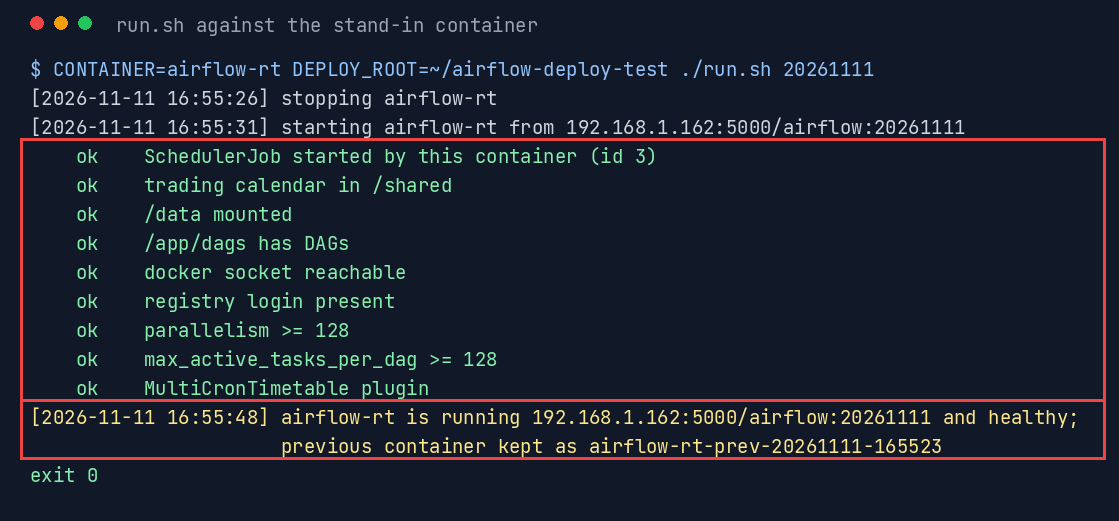
restart.sh status, a SchedulerJob that started after the new container, the trading calendar,/data, DAG files present, the docker socket, the registry login, both concurrency values at 128 or more, theMultiCronTimetableplugin, and the UI’s/healthon the host port. - Roll back on any failure.
To test it without touching production, I made a stand-in: a container called airflow-rt started exactly the way the current one was, but with a sqlite DB, one placeholder DAG and UI port 18081. Then I ran run.sh against it with CONTAINER=airflow-rt. The featured image at the top is one of those runs.
Three things the tests caught
1. airflow jobs check --allow-multiple fails on its own. status reported the scheduler as down while /health said it was healthy. Running the command by hand:
|
|
The fix is airflow jobs check --job-type SchedulerJob --local --limit 5 --allow-multiple.
2. set -e skipped the rollback. To test the rollback I forced a failed health check with HEALTH_TIMEOUT=0. The script exited 1, and the new, unchecked container stayed in place. With zero loop iterations, status.txt never existed, so cat status.txt | sed failed under set -euo pipefail and the script ended before reaching the rollback code. Fixing that one line isn’t enough, because the next unexpected failure would do the same. The real fix is an EXIT trap: once the old container is stopped, any non-zero exit rolls back.
|
|

3. /health can vouch for a dead scheduler. The tests didn’t hit this one; I found it reading the first successful run’s output. /health calls the scheduler healthy if any SchedulerJob heartbeat is less than 30 s old. After a docker kill, the old scheduler’s last heartbeat stays fresh for up to 30 s, and the first health probe runs 10 s after the start. So run.sh also requires a running SchedulerJob whose start_date is after the new container’s StartedAt, and prints its id. You need that id anyway if any queued_by_job_id has to be repointed.
Results
All deploy times are against the stand-in. Production is still on v1.3 and will move when nothing is running.
| Step | Time |
|---|---|
| build: diff, tar, image | 6 s |
| build: DagBag parse of 66 DAGs | 7 s |
| build: sandbox boot test | 27 s |
| build: push (new layers only) | 38 s |
build: docker save | gzip, 2.1G tarball |
5 min 33 s |
| deploy from local image, start to healthy | 16 s |
| deploy from registry (already up to date), whole script | 22 s |
| deploy from tarball, checksum + load + healthy | 69 s |
| forced failure → old container running again | 1 s |
Takeaways
- Build from what’s running, not from memory. The
auth_backendsedit from 10:59 existed only in the container. A diff-based build keeps hand fixes like that; a clean rebuild from an old Dockerfile would have dropped it. - Mounts are never in an image, so don’t snapshot them, but check them on every deploy. Logs and DAGs never needed excluding. What kept breaking was containers recreated without those mounts, which is why
run.shrefuses when one is missing. docker commitcopies the env, and the env is where secrets go. Checkdocker inspect -f '{{.Config.Env}}'on any image you’re about to push. Override secrets with empty values and pass the real ones at runtime.- Test the rollback by forcing a failure. My rollback looked right and didn’t work. Under
set -e, rollback belongs in anEXITtrap, not after the step that might fail. - A health check must prove the new process is healthy. A heartbeat in a shared database can belong to the process you just killed.
- Supervise both processes.
cmd & exec otheronly watchesother.
References
- Postmortem this follows: One night, one dead disk
airflow jobs checkand the/healthendpointdocker diff,docker run --init- Scripts: build.airflow.sh, run.sh, restart.sh
相关内容
- One night, one dead disk: an Airflow trading-host outage and what it taught me
- bash入门
- docker buildx
- bashrc prompt 颜色设置
- Docker 使用 systemctl
 支付宝
 微信