
Nested tmux over SSH: why Ctrl-k worked through a relay but not directly
 william 收录于 Tools
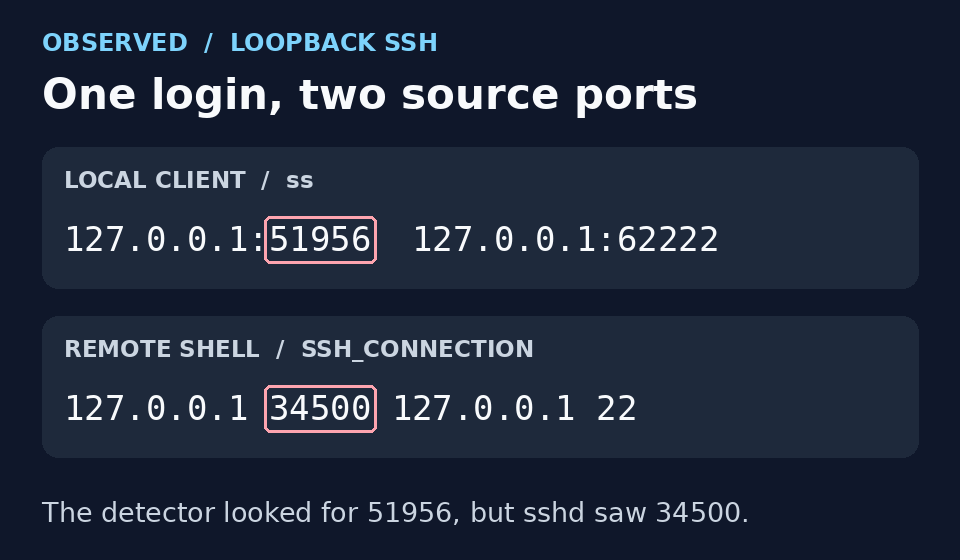
Ctrl-k reached my remote tmux when I logged in through a relay, but the same key went to local tmux when I connected directly. The loopback login, nb, and nbx all reached the intended SSH server. The problem was how my local helper decided where to send the key.
The fix was to treat known forwarded endpoints differently from a relay. For ports 62222 and 62223, I already knew the destination used Ctrl-k, so I could skip detection. For a relay, I still needed to detect when the second SSH connection started and ended. This follows up on my two-hop tmux setup.
The situations I wanted to support
My local tmux 3.5a setup normally behaves as though its prefix is Ctrl-k. In fact, its real prefix is Ctrl-b; a root-table binding decides what to do with Ctrl-k. The destination tmux uses Ctrl-k as its real prefix.
| Where I am | What Ctrl-k should control |
|---|---|
| Local zsh, no SSH login | Local tmux |
Direct SSH via loopback or nb (62222), or via nbx (62223) |
Remote tmux when attached; the key passes through for the whole SSH login |
| Logged in to the relay, at its shell | Local tmux |
| Second SSH hop active from that relay | Remote tmux when attached; the key passes through while the second hop is active |
| Back at the relay after the second hop exits | Local tmux again |
Ctrl-b always controls local tmux. Hostnames and the LAN address below are replaced with examples; 192.0.2.82 is a documentation address, not a working target.
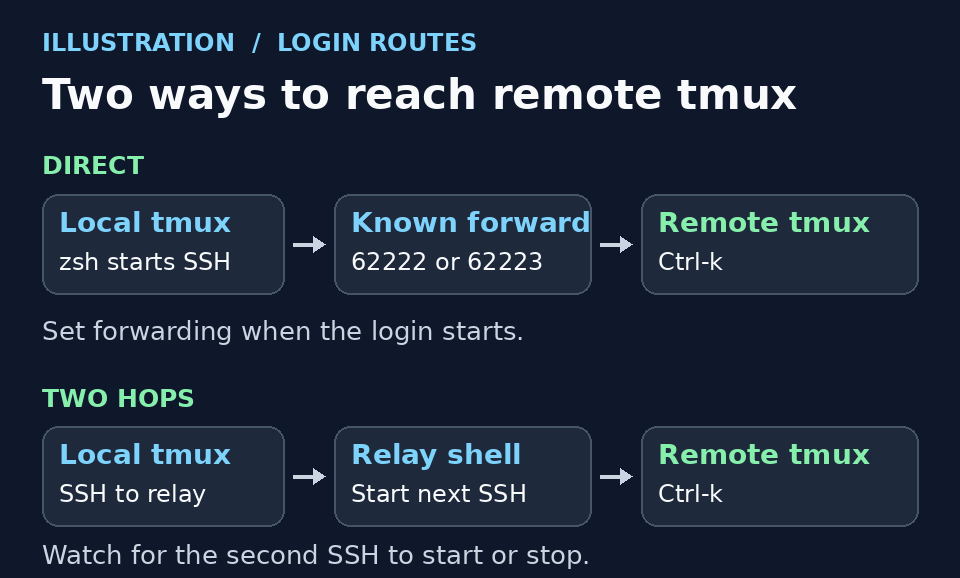
Conceptual diagram: the direct route can be decided at login; the relay route needs to change while the first login is still open.
Here are the direct commands and the two zsh shortcuts from ~/.tmux/scripts/me.sh, with the example address substituted:
|
|
For the two-hop route, I run ssh relay.example from local zsh. Then, at the relay shell, I run ssh william@192.0.2.82 -p62222 and attach tmux on the destination as usual. The relay itself does not have to be running a tmux client for this to work.
Why the direct login failed
The existing detector finds the local interactive SSH connection with ss, takes its TCP source port, and looks for the same port in SSH_CONNECTION on the server. That lets it find the login’s own SSH_TTY, rather than querying an unrelated tmux client. The assumption is that the source port is the same at both ends.
I checked both ends of the same live loopback login. On the client I ran ss -Htnp dport = :62222 and selected the row for the interactive ssh process. In the remote shell I read SSH_CONNECTION. These are excerpts from that test:
|
|

Rendered from the observed values, not a live screenshot. The red boxes mark the client port in each view.
The connection to the forwarded port worked, but the destination sshd saw a different connection arriving on port 22. Its source port was 34500, not 51956. The detector searched for 51956, found no matching login terminal, and left Ctrl-k local. It did not fall back to a tmux-only lookup: a local port had been found, so it had already selected terminal-aware detection.
nb and nbx reach forwarded endpoints too. I checked both via the LAN address: each reported a loopback connection to port 22 in SSH_CONNECTION, and the destination tmux reported C-k as its configured prefix. The first fix covered only 127.0.0.1:62222; that is why the explicit loopback command worked but nb still did not.
The fix: one key binding, two routing policies
The local tmux binding did not need to change. Here is the part of ~/.tmux.conf that decides where Ctrl-k goes:
|
|
When the pane flag is 1, tmux sends Ctrl-k into that pane and SSH carries it onwards. Otherwise, the next key uses the local prefix table. if-shell -F evaluates a tmux format; pressing the key does not launch a shell or run an SSH probe.
What changed was the code that sets the flag in ~/.tmux/scripts/ssh-auto-prefix.sh. The zsh ssh() wrapper calls this script for SSH started inside local tmux. The helper records the destination and the explicit -p value (both -p62223 and -p 62223 work) before choosing a policy:
- Known direct endpoint: match the exact user, address, and port. Set the pane flag to
1before SSH starts; don’t start an observer. This covers loopback62222and the LAN shortcutsnb(62222) andnbx(62223). Forwarding is intentional even before attaching remote tmux; it follows the login, not the tmux attachment. - Other interactive SSH logins: start with the flag at
0and let the Python observer watch the first hop. A relay shell keepsCtrl-klocal. A detected foregroundsshorautosshon that terminal sendsCtrl-kdownstream. When the foreground job returns to the shell, the observer sends it back to local tmux. - On logout: restore whatever the pane flag was before SSH started. The helper skips routing for invocations such as explicit remote commands and
ssh -Ntunnels.
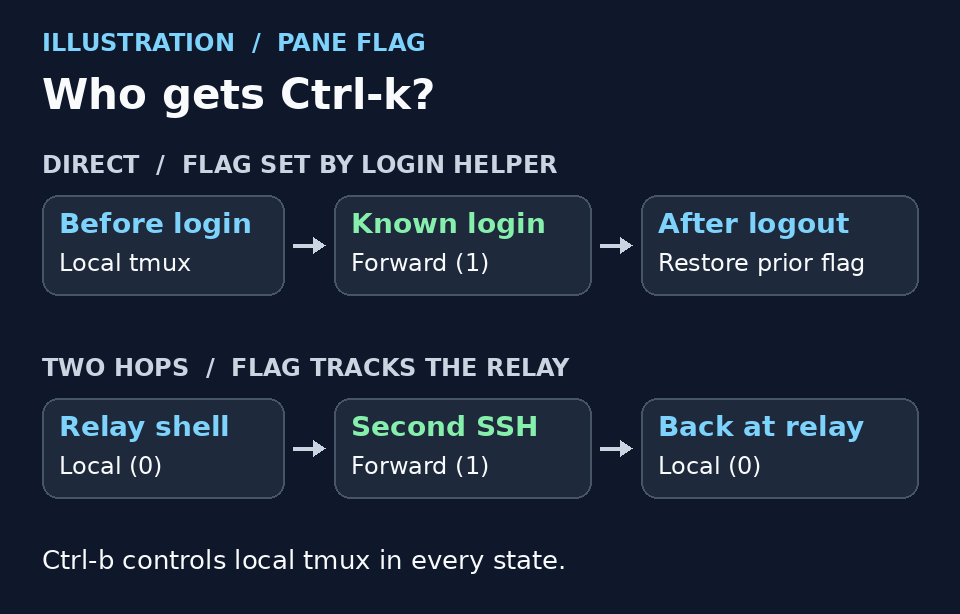
Conceptual state diagram. The relay observer infers that the second hop should receive Ctrl-k; it does not verify that host’s prefix.
If you already have the local tmux binding and zsh wrapper from the earlier post, save the updated Bash helper and the Python observer under ~/.tmux/scripts/. Substitute your known endpoints in the Bash helper and reconnect. Leave the shortcut definitions in place. There is no tmux or zsh reload for a script-only update. If the flag is wrong in an already-open login, press Ctrl-b, then F12 to toggle it for that local pane.
What I tested
I used isolated tmux servers for tests that needed custom key bindings. The test bound Z to different actions on each side so I could tell which tmux had actually consumed the prefix.
| Path | Verified |
|---|---|
ssh william@127.0.0.1 -p62222 |
Live login set and restored the pane flag. A separate isolated tmux test verified that a marked pane receives the Ctrl-k byte and Ctrl-b remains local. |
nb |
Live login from zsh. Ctrl-k Z invoked the remote test binding, Ctrl-b Z invoked the local one, and logout restored local Ctrl-k. |
| Relay → second SSH hop | Ctrl-k Z invoked the local binding at the relay and the remote binding after the second hop. Ctrl-b Z stayed local. Ctrl-k d detached remote tmux; exiting the second SSH hop made Ctrl-k Z local again. |
nbx |
Live login on 62223 set the forwarding flag; logout restored it. The destination reported C-k. I did not run a remote keystroke test on this port. |
To check routing from a different local pane without touching the remote configuration:
|
|
Look for 1 in the SSH pane when Ctrl-k should pass through. On the relay route the flag may take about one observer cycle to change. A missing flag, or 0, means local routing.
Takeaway
A successful SSH login proves the connection works. It does not prove both ends see the same TCP source port. For a known forwarded endpoint, set the routing policy at login. For a relay whose foreground job can change, keep the decision dynamic. In both cases, leave a separate key (Ctrl-b here) that always reaches local tmux.
相关内容
- Nested tmux over SSH: dynamically route Ctrl-k across two hops
- tmux 设置默认 zsh
- Linux开发环境一键部署
- 配置强大终端: zsh+tmux+powerline+autojump
- Keep SSH reachable with a closed lid on Linux Mint
 支付宝
 微信