
Nested tmux over SSH: automatically route Ctrl-k to the remote
 william 收录于 Tools
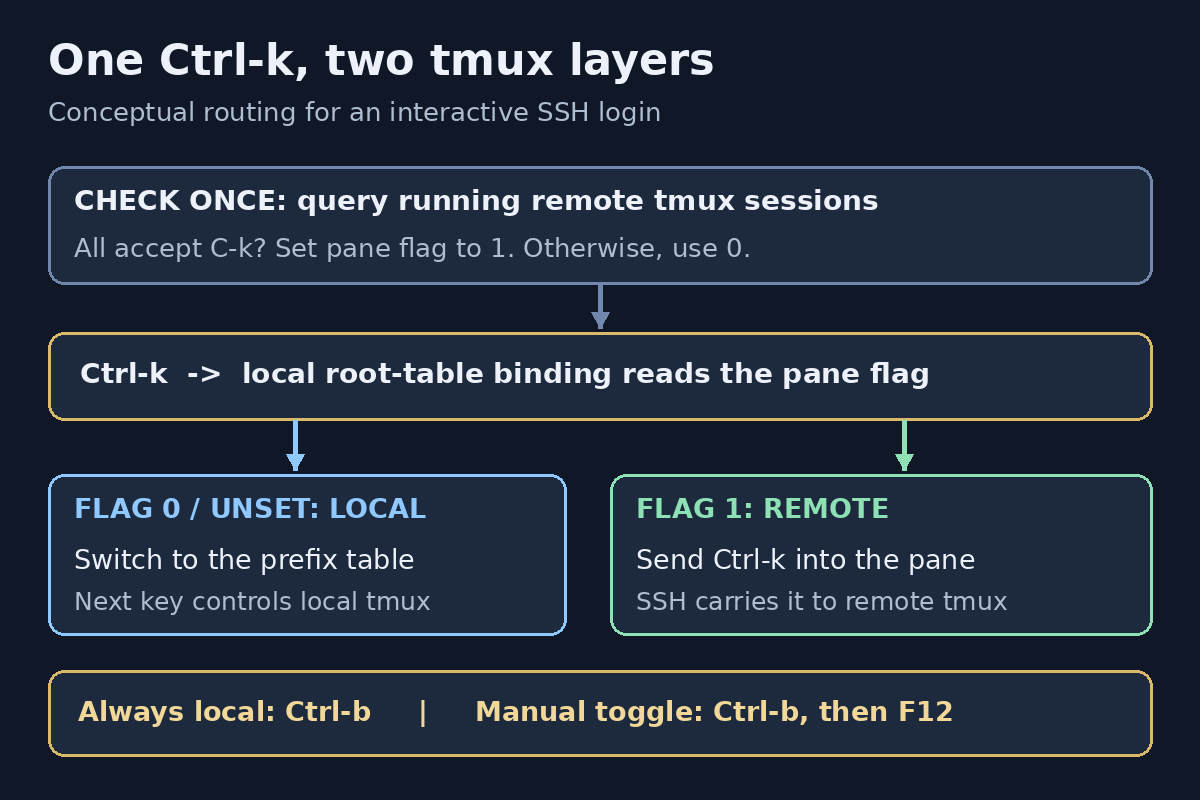
My local tmux and one remote tmux both used Ctrl-k as their prefix. After connecting over SSH, Ctrl-k c still created a local window. The local tmux consumed the prefix before SSH could send it to the server.
I wanted Ctrl-k to control the remote when its tmux also accepted Ctrl-k, but stay local for other servers. The working solution uses a pane-local flag and one SSH probe per login. Ctrl-b remains an always-local escape hatch.
The setup and the behavior I wanted
My local setup runs tmux 3.5a with zsh. The connection in question is:
|
|
The loopback address and port are simply this connection’s endpoint. Nothing in the solution hard-codes them; it should also work with an SSH host alias or a normal hostname.
Before the change, both tmux instances had the equivalent of:
|
|
The desired routing was:
| Context | Ctrl-k |
Ctrl-b |
|---|---|---|
| Local shell | Local prefix | Local prefix |
SSH login; running remote sessions all accept Ctrl-k |
Forward to remote | Local prefix |
| SSH login; remote uses another prefix | Local prefix | Local prefix |
| Probe fails or finds no running tmux | Local prefix | Local prefix |
Here, “accept” means either the remote session’s prefix or prefix2 is C-k.

Conceptual illustration, not a captured terminal trace. The SSH check sets the flag once; pressing a key does not launch another probe.
Why sending the prefix twice was not enough
A conventional nested-tmux setup provides a send-prefix binding. The first prefix addresses local tmux; a second key sends a prefix through to the inner tmux.
That is useful, but it was not the behavior I wanted. I wanted the same single Ctrl-k press to choose the right layer automatically.
There was another constraint: my existing Ctrl-k Ctrl-k binding resizes a pane upward:
|
|
Replacing that with send-prefix would silently remove an existing shortcut. The solution needed to preserve the prefix table, not rebuild it.
Local tmux cannot discover a remote prefix by itself
SSH carries terminal input and output. It does not advertise the remote tmux configuration to the local tmux.
Looking at the local pane’s process name only tells me that it is running ssh. It does not tell me whether a remote tmux exists, which session I will attach to, or what that session’s prefix is.
Auto-detection therefore needs a remote query. The useful query is:
|
|
It reads the effective prefix settings of running sessions on the default remote tmux socket. It does not start a tmux server or parse a configuration file.
The conservative policy is:
- At least one session must be returned.
- Every returned session must accept
C-kin either prefix slot. - Any failure or ambiguous mixture keeps
Ctrl-klocal.
Checking every session avoids guessing which one a later tmux attach will choose. It still cannot identify the active application inside the remote terminal; that limitation matters later.
Step 1: dispatch Ctrl-k in the local root table
Add this block at the end of the local ~/.tmux.conf, after earlier prefix settings and plugin initialization:
|
|
The actual tmux prefix becomes C-b. Ctrl-k instead becomes a normal key binding in the root table:
- With
@remote_ctrl_kequal to1,send-keys C-kwrites the key into the pane. SSH then carries it to the remote. - Otherwise,
switch-client -T prefixmakes the next key use the existing local prefix table.
Keeping prefix C-k and merely adding a root-table binding would not work: tmux would recognize its prefix first instead of dispatching that root binding.
The -F option is important. The condition is evaluated as a tmux format; it does not spawn a shell for each key press. This follows the same keep-forks-out-of-the-input-path principle from my tmux latency investigation.
The routing flag is pane-local, not global. Two panes connected to different servers can therefore make different decisions.
Existing prefix-table commands are untouched. In an ordinary local pane, Ctrl-k Ctrl-k still runs the resize binding. In a forwarding pane, Ctrl-b Ctrl-k addresses that same local resize command.
Do not copy this block to the remote configuration. The remote can keep its normal prefix C-k.
Step 2: probe before an interactive SSH login
The helper is available as a downloadable Bash script. Save it locally as ~/.tmux/scripts/ssh-auto-prefix.sh. It is invoked with bash, so an executable bit is not required.
The central probe is:
|
|
A few details matter:
- No second password prompt.
BatchMode=yesmakes the probe noninteractive. It needs an identity or an existing connection that can authenticate without prompting. If that is unavailable, the regular SSH login still runs normally, with local key routing. - Reuse connection settings. The original arguments carry the host, port, identity, config file, and jump-host options. The probe’s protective options come first because OpenSSH generally uses the first obtained value for each option.
- Avoid login side effects where possible. The probe requests no terminal, clears configured forwarding, disables
LocalCommand, and overridesRemoteCommand. It is still a real SSH command: remote shell startup and server-side SSH policy can affect it. - Do not probe on every key press. The query runs once before the login. There is no periodic remote polling.
- Preserve ordinary command invocations. The argument scanner skips detection for explicit remote commands and noninteractive modes such as
-N,-T, and-W. It is a small scanner, not a complete replacement for OpenSSH’s parser; unusual invocations should bypass the wrapper.
After a successful match, the helper sets:
|
|
For an eligible login whose probe fails or does not match, it sets the flag to 0. That prevents an old manual forwarding flag from accidentally carrying over into a different connection.
The helper saves the previous pane value and uses an EXIT trap to restore it after SSH exits. If there was no previous value, it unsets the pane option. Normal disconnects therefore return the pane to its previous behavior.
It also prints this notice when forwarding is enabled:
|
|
Step 3: wrap ssh in the local zsh configuration
Add this function to the local ~/.zshrc:
|
|
command ssh calls the real SSH executable rather than recursively invoking the function. The helper also uses command tmux, which avoids my local oh-my-zsh tmux alias.
Load the configuration from a local terminal:
|
|
Then connect with the usual command:
|
|
There is no special host-specific function to remember. Outside tmux, the wrapper simply calls SSH without a probe.
Checking the result
These local commands inspect the installed configuration:
|
|
In my setup, the checks returned:
|
|
The important combination is prefix C-b, a conditional root binding for C-k, and the original resize binding still present.
I checked the helper with bash -n and ShellCheck. Mocked SSH tests covered matching prefixes, different prefixes, a matching secondary prefix, mixed sessions, no tmux, probe failure, remote commands, a tunnel invocation, and SSH config options. A throwaway tmux server verified that the bindings loaded, the resize binding survived, and the manual toggle worked in both directions.
Those checks were followed by the actual SSH connection: automatic routing worked in that connection. The mocked tests are not evidence that every possible SSH option combination works.
When forwarding is active:
| Keys | Action |
|---|---|
Ctrl-k, then c |
Create a remote tmux window |
Ctrl-b, then c |
Create a local tmux window |
Ctrl-b, then F12 |
Toggle Ctrl-k routing manually |
The c actions assume the usual tmux binding for creating a window.
Limits worth keeping visible
This is connection-time prefix detection, not continuous detection of the foreground remote application.
- Forwarding covers the entire SSH login. If I detach from remote tmux but keep the SSH connection open,
Ctrl-kstill goes to the remote shell.Ctrl-b F12switches it back manually. - No running remote server means no match. If I start tmux only after logging in, the earlier probe cannot know its prefix. I can use the manual toggle rather than guessing from an unexecuted config file.
- Mixed session prefixes deliberately fall back. Even if I intend to attach to a matching session, another nonmatching session makes the result ambiguous.
- Custom sockets are not discovered. Sessions started with
tmux -L ...ortmux -S ...need a correspondingly targeted query. - The remote noninteractive PATH matters. A tmux binary available only after an interactive shell setup may not be found by the probe.
- There is an extra SSH command before login.
ConnectTimeout=4limits connection establishment, not the complete remote command. Slow jump hosts or shell startup can still add delay. - Remote policy and output can interfere. Restricted accounts, forced commands, or shell startup text may prevent a clean prefix result. This helper is for ordinary, trusted login accounts, not a universal SSH frontend.
- Cleanup is best effort. Normal exits restore the flag. An uncatchable termination such as
SIGKILLcan leave it set; the manual toggle is the recovery path. - Copy mode is separate. These bindings govern normal pane input, not every key table used by local tmux copy mode.
To skip all detection for a particular invocation:
|
|
Bypassing the wrapper does not itself clear a manually enabled pane flag; use Ctrl-b F12 if necessary.
One more detail: because the actual local prefix is now C-b, plugins or custom bindings that inspect #{prefix} or run send-prefix see C-b, not the synthetic Ctrl-k dispatcher. Check those separately if the configuration relies on them.
Takeaway
The fix was to separate the key I press from tmux’s actual prefix setting. Ctrl-k becomes a conditional dispatcher, while Ctrl-b remains a reliable route to the outer tmux.
The remote query only decides a pane flag. Keeping that network operation out of the key path makes the behavior simple: unknown means local, a confirmed matching prefix means remote, and the manual override is always reachable.
References
相关内容
- tmux 设置默认 zsh
- Linux开发环境一键部署
- 配置强大终端: zsh+tmux+powerline+autojump
- Keep SSH reachable with a closed lid on Linux Mint
- Lining up the Claude Code status line with my powerlevel10k prompt: padding -2 and a 5-second refresh
 支付宝
 微信