
Keep SSH reachable with a closed lid on Linux Mint
 william 收录于 Linux
My Linux Mint notebook accepted SSH connections while its lid was open, but became unreachable when I shut it. The connection command was unchanged:
|
|
The relevant setting was not in sshd_config. Cinnamon was configured to suspend the notebook when the lid closed, even on AC power. I changed just the AC lid action, leaving the battery policies alone.
The setup: change the destination, not the forwarding machine
In this setup, 127.0.0.1:62223 was the local entry point for reaching the notebook. A listening local port did not establish that the destination notebook was awake or that its SSH server could respond.
The initial check on the connecting machine was:
|
|
The port was listening, but the SSH attempt reported:
|
|
That meant the client had not received the SSH server’s greeting in time. It was consistent with an unavailable destination behind the local forwarding endpoint, but the timeout alone did not prove that the notebook was asleep. Forwarding problems can produce similar symptoms.
Once the notebook was accessible again, I connected and checked the destination OS:
|
|
The relevant output was:
|
|
The important distinction was where the next commands ran: on the notebook, not on the machine exposing port 62223. Hostnames are omitted from this write-up.
Check the lid state and desktop power manager
On the notebook:
|
|
The output included:
|
|
The lid was open during inspection. The csd-power process identified Cinnamon’s power manager, which made its power settings the next place to look.
These commands are specific to systems exposing this ACPI lid path and these desktop processes. Other Linux desktops may manage lid events differently.
Read the current policy before changing it
On the notebook:
|
|
The relevant settings were:
|
|
Both lid-close actions were suspend. The AC idle timeout was already 0, meaning automatic idle suspend was disabled for that policy. Idle sleep and lid-close sleep are separate settings. Disabling one does not necessarily disable the other.
I also checked the values accepted by the lid setting:
|
|
|
|
The notebook was connected to AC power; its power-supply status included:
|
|
That made an AC-only change a reasonable default: keep the notebook reachable on the desk without making it stay awake on battery inside a bag.
The fix: one per-user setting
This was the actual change, executed remotely on the notebook:
|
|
Equivalently, from a terminal on the notebook itself:
|
|
This changes the current user’s persistent Cinnamon preference. It does not edit SSH configuration, require sudo, or require a reboot. In this session, the remote gsettings command succeeded and the value read back correctly.
Run it as the user whose Cinnamon desktop session controls power management. If a remote command reports a D-Bus or dconf error, use a terminal in that user’s active graphical session instead; do not switch to sudo gsettings, which targets the wrong user’s settings.
Verify the policy separately from the closed-lid test
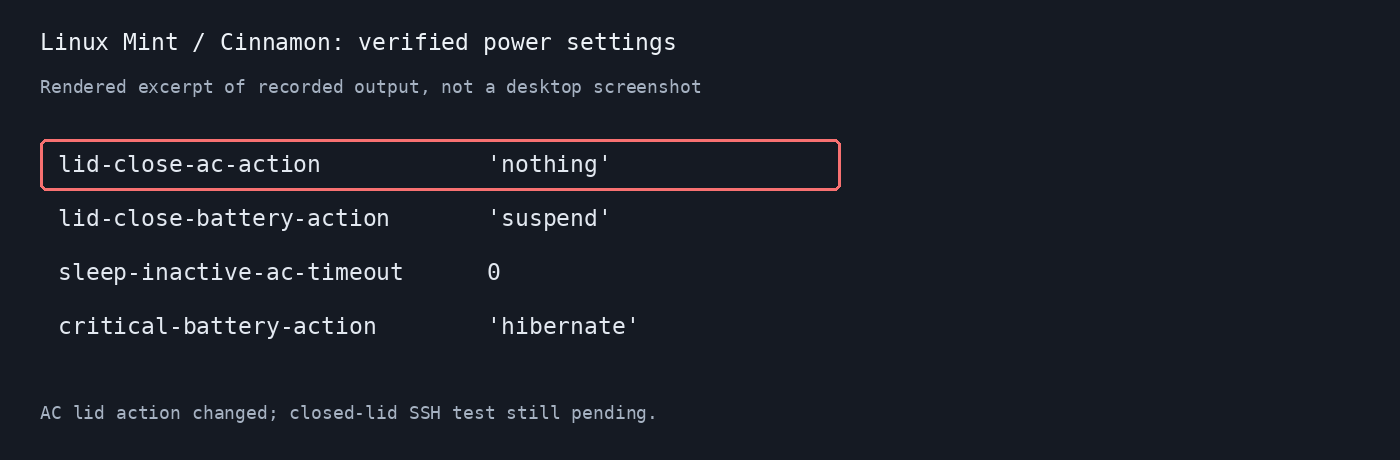
On the notebook, I read back all four relevant values:
|
|
The actual output, in that order, was:
|
|
| Policy | Before | After |
|---|---|---|
| Lid closed on AC power | Suspend | Do nothing |
| Lid closed on battery | Suspend | Suspend |
| AC idle-suspend timeout | Disabled (0) |
Unchanged |
| Critical-battery action | Hibernate | Hibernate |
This verified that the configuration change succeeded. It did not yet verify the complete closed-lid connection path.
The final test is physical:
- Keep the notebook plugged into power and leave its Cinnamon session logged in.
- Close the lid and wait long enough for the usual failure to occur.
- From the connecting machine, open a fresh SSH connection:
|
|
At the time of writing, that closed-lid test had not yet been confirmed. The verified result is the updated power policy, not a measured end-to-end success with the lid shut.
Why I did not change systemd-logind or SSH keepalives
Linux can have more than one layer handling lid events. systemd-logind has system-wide lid policies, while a desktop power manager can take responsibility for lid handling.
I checked:
|
|
The notebook had a csd-power inhibitor for handle-lid-switch. That supported changing Cinnamon’s policy first rather than immediately editing /etc/systemd/logind.conf.
This fix is scoped to the active Cinnamon user session. If the problem persists at the login screen, after logging out, or under a different desktop, inspect the effective logind configuration and that desktop’s power manager separately. I did not modify logind or disable suspend system-wide.
SSH keepalives are also not a substitute for keeping the destination awake. They can detect a dead connection or help with some idle-network timeouts; they cannot make a suspended notebook process SSH traffic. This is a different failure mode from ordinary SSH disconnects and timeouts.
Undo the change
To restore the notebook’s original AC lid action:
|
|
Keep a running notebook ventilated when its lid is shut. With this AC-only change, unplugging it restores the battery lid policy; do not expect closed-lid SSH access on battery.
Takeaway
When SSH stops responding specifically after a laptop lid closes, check power management before changing sshd. In this case, the smallest change was one Cinnamon preference: do nothing on lid close while plugged in, and preserve the existing battery protections.
相关内容
- ChatGPT models in Claude Code: gptcc setup and troubleshooting
- Linux 时区、系统时间与 tmux 状态栏时间不一致的排查
- zsh compinit: insecure directories, run compaudit for list
- c++ 内存对齐
- neovim 入坑
 支付宝
 微信