
ChatGPT models in Claude Code: gptcc setup and troubleshooting
 william 收录于 Tools
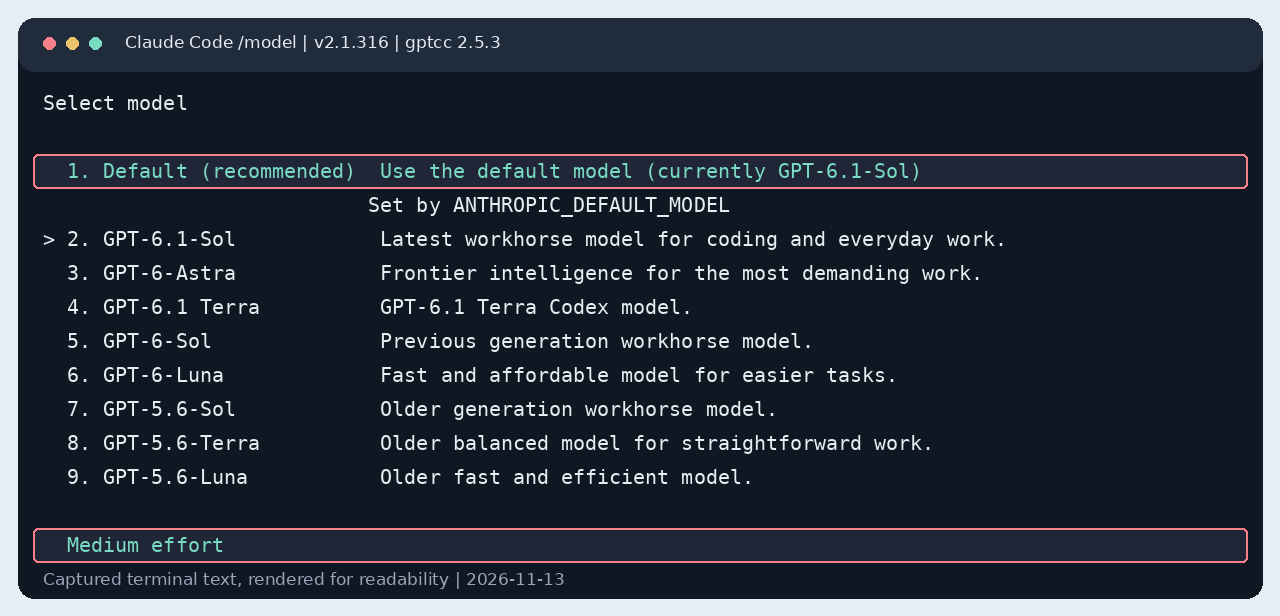
I wanted Claude Code’s terminal interface and tools to run ChatGPT models. Installing gptcc was only the first step. I could select Sol in /model and still get an account-hold error before the request reached GPT.
The working setup uses a local authenticated gateway, ChatGPT OAuth, and Claude Code’s custom model picker. It lists eight GPT models, makes Default resolve to GPT-6.1 Sol with medium effort, and displays Codex’s five-hour and weekly usage beside the model. A real Claude Code session completed a file-read tool call in two turns.
The featured image reproduces the live /model menu. The red boxes mark the Default model and medium effort. Terminal pictures in this post are rendered from captured output for readability, not photographs of a terminal window. Open the full-size picker image.

The configuration I tested
This post records the setup on November 13, 2026. Package defaults, model availability, and Claude Code’s configuration keys change. The installed code and the live requests mattered more than an older README example.
| Component | Observed value |
|---|---|
| Operating system | Linux |
| Node.js | v24.20.0 |
| Claude Code | 2.1.316 |
| gptcc | 2.5.3 |
| Local gateway | http://127.0.0.1:52532 |
| Default model | gpt-6.1-sol |
| Saved effort for Sol | medium |
| Upstream identity | Existing ChatGPT OAuth login |
| Verification | Claude Code invoked Read and returned the file contents |
gptcc translates requests between Claude Code and GPT. It is a community project. Anthropic’s gateway documentation describes the gateway mechanism but explicitly does not support routing to non-Claude models. Treat this as a version-specific interoperability setup, not an official multi-provider feature or a guarantee of continued compatibility.
I previously wrote about installing Claude Desktop on an older Ubuntu system. This post concerns the claude terminal application. The desktop application’s connector behavior can differ.
Understand the two credentials before changing settings

There are two separate connections in the final configuration:
- Claude Code authenticates to my local gptcc gateway.
ANTHROPIC_AUTH_TOKENis the client credential. The gateway checks it againstGPTCC_AUTH_TOKEN. - gptcc authenticates to ChatGPT using the existing OAuth login in
~/.codex/auth.json.
The two local gateway variables contain the same randomly generated value. They do not contain the ChatGPT access token. I did not copy OAuth tokens into Claude settings.
The gateway address chooses a destination. The gateway credential chooses the authentication route. Setting only ANTHROPIC_BASE_URL left Claude Code using my saved claude.ai login. That distinction explained the most confusing failure in this session.
Install gptcc and use the native messages route
First check the installed tools:
|
|
Install gptcc if it is missing:
|
|
For the tested gptcc version, use the native messages route and explicitly name the GPT model:
|
|
This is the recommended starting command for this guide. During the investigation I initially used --multi-slot; the Bedrock transport that option enabled failed with this Claude Code version. I explain that error below.
If gptcc cannot reuse an existing ChatGPT login, complete its browser login. On a remote machine, its device-code option is available:
|
|
Use a ChatGPT account that can access the requested model. A model appearing in someone else’s screenshot does not establish access for your account. In this session I obtained the model IDs and descriptions from the local Codex model list.
GPTCC_NO_UPDATE=1 kept the package version stable while diagnosing it. It is not a model-routing setting. env -u OPENAI_API_KEY prevents this setup process from selecting gptcc’s API-key path through an inherited environment variable.
Apply the configuration without exposing credentials
The configuration helper merges the settings used in this guide. Download it together with model-picker.json into the same directory, inspect both files, and run:
|
|
The helper is for Linux and macOS. It locates the installed node and gptcc startup hook, backs up ~/.claude/settings.json, generates a local gateway token, and writes the settings with mode 0600. It preserves unrelated settings and hooks. Repeating it does not generate another token or another identical startup hook.
The helper changes model routing, the picker, the Sol effort setting, and connector loading. It does not sign in for you, install the optional status bar, or restart an already running proxy.
The relevant part of ~/.claude/settings.json looks like this. The angle-bracket values below are placeholders, not usable credentials:
|
|
This is an excerpt. The helper also installs the full picker and a correctly structured SessionStart hook. Merge settings rather than replacing the whole file with the excerpt.
If your network requires an HTTP proxy, keep your existing working HTTPS_PROXY, HTTP_PROXY, and NO_PROXY settings. NODE_USE_ENV_PROXY=1 made the tested Node runtime honor them. Do not copy my network’s proxy address. Keep 127.0.0.1 and localhost outside that upstream proxy route.
Restart the proxy with the new environment
A running process keeps its original environment. Editing OPENAI_API_KEY or GPTCC_AUTH_TOKEN in a JSON file does not update the existing gptcc process.
Wait until other gptcc sessions are idle before restarting this shared local proxy. Then run:
|
|
If no proxy is running, there is nothing to shut down. A connection-refused error in that case is different from a model or authentication failure.
Start the hook with the settings environment. This command does not print the credential:
|
|
After the detached process has started, check it:
|
|
The observed health response was:
|
|
apiKeyFallback: false confirms that this process has not selected its API-key backend. authRequired: true confirms that the local proxy requires its own credential. bedrockInvoke: true advertises an available proxy endpoint; it does not mean Claude Code is using that transport.
Exit any older Claude session with /exit, then run claude again. The existing terminal session may still have the old environment.
Add all eight GPT models to /model
The first attempt put Sol behind the Sonnet alias and Terra in the single custom slot. Sol could be the selected model without appearing as the explicit picker entry I expected.
For one model, ANTHROPIC_CUSTOM_MODEL_OPTION is enough. For the whole list, I used Claude Code’s modelPicker setting. Its documented lineup format accepts rows with model IDs, labels, and descriptions.
The companion model-picker.json contains these verified local Codex IDs:
| Model ID | Label in my Codex list |
|---|---|
gpt-6.1-sol |
GPT-6.1-Sol |
gpt-6-astra |
GPT-6-Astra |
gpt-6.1-terra |
GPT-6.1 Terra |
gpt-6-sol |
GPT-6-Sol |
gpt-6-luna |
GPT-6-Luna |
gpt-5.6-sol |
GPT-5.6-Sol |
gpt-5.6-terra |
GPT-5.6-Terra |
gpt-5.6-luna |
GPT-5.6-Luna |
A display label is not a model ID. Preserve the dots and hyphens in the first column when sending a request.
The helper installs those rows in this structure:
|
|
That excerpt shows two rows; the downloadable file contains all eight. replaceBuiltInOptions: true removes the unrelated built-in lineup from this menu while retaining Default. It does not implement access control or remove a model from a provider.
Restart Claude Code, enter /model, and inspect the list. I verified all eight rows in the actual menu. I sent end-to-end requests through Sol, not through every model in the list.
Make the selector’s Default entry use Sol, medium
I initially solved the wrong part of this request. Setting:
|
|
selected Sol at startup. It did not change what the selector’s Default (recommended) row meant. That row still said:
|
|
The final configuration sets:
|
|
I removed the top-level model override to let the default apply. I also briefly tried the literal JSON value "model": "default"; in this installed build it appeared as a custom model named default. Selecting the real Default row in the UI removed that override and selected Sol correctly.
The verified picker text became:
|
|
The effort control showed Medium effort. A fresh launch then showed:
|
|
A later explicit choice saved with /model can override the startup selection. That does not change the target of the Default row. I verified the row itself rather than inferring its behavior from the startup header.
What failed, and what fixed it
These were separate failures. A working proxy did not prove that Claude Code had selected the right identity, transport, or picker default.
gptcc was installed, but Claude settings were missing
The first status check reported:
|
|
The process and OAuth login already existed. Claude’s user settings still selected opus. Running setup restored routing settings, but I still had to select an available GPT model and configure gateway authentication.
To inspect the non-secret state:
|
|
Do not paste the whole settings or OAuth file into a public issue. Print only the fields needed for the diagnosis.
An inherited API key selected the wrong backend
The shell contained OPENAI_API_KEY. gptcc’s health endpoint initially reported:
|
|
In the installed proxy, a nonempty API key selects the OpenAI API path. My goal was to use the existing ChatGPT login. I cleared the variable for the proxy process, added an empty override to Claude’s environment, and restarted the proxy.
This changed apiKeyFallback to false. I did not delete the key from the user’s shell profile or alter other tools that might use it.
The generic API Usage Billing text in Claude’s header is not evidence of an OpenAI API charge. It describes Claude’s gateway-authentication mode. I used the proxy’s actual backend flag and request result to check which route was active.
The proxy could not reach ChatGPT
The first GPT smoke test failed with:
|
|
The existing HTTP proxy was reachable, but this Node process had not enabled environment-proxy support. A read-only request with node --use-env-proxy reached the ChatGPT endpoint and received HTTP 401. That response proved network reachability, not successful authentication.
Starting gptcc with NODE_USE_ENV_PROXY=1 fixed the connection in this environment. Preserve the normal loopback route to 127.0.0.1:52532; only the upstream connection needs the external network proxy.
A fetch failed message alone does not prove a particular filtering mechanism. Check the proxy connection, DNS, and TLS before changing authentication.
gptcc’s bundled GPT-5.4 test used an unavailable model
Once networking worked, gptcc hello reached the backend and failed differently:
|
|
The tested gptcc package still hard-coded gpt-5.4-auto in its hello command, resolving to gpt-5.4. My local Codex model list contained the GPT-6 and GPT-5.6 IDs above. A request with gpt-6.1-sol succeeded.
This was an observed rejection for this account and backend at that time. It was not evidence that ChatGPT authentication was broken or that every account rejects that older model.
I left the npm package’s source unchanged. For this version, I used the model-specific verification script below instead of treating its bundled hello command as authoritative.
–multi-slot enabled a transport Claude Code rejected
The all-GPT picker option initially looked convenient:
|
|
It enabled Bedrock mode. The actual Claude Code test then failed with:
|
|
The proxy’s advertised Bedrock endpoint did not satisfy this client’s streaming expectation. I removed these keys from the Claude environment:
|
|
The native messages route plus modelPicker gave me the GPT list without that transport. I did not suppress the client’s content-type check.
The startup plugin was not actually registered
Setup reported a fallback installation under ~/.claude/plugins/gptcc, but claude plugin list did not list gptcc as installed. The local validation command also reported that the bundled hook entries were ignored because they lacked the expected hooks array.
I used the installed startup helper directly from a user-level SessionStart hook. The required nesting is:
|
|
The configuration helper generates that command with the installed Node and package paths. The startup helper detaches the proxy process. Running only the shell launcher directly from the automation process did not leave a surviving proxy in my test; invoking the Node startup helper did.
The gptcc doctor command also initially reported that Claude was missing. It searched a few fixed paths and missed the executable under the Node installation. command -v claude found the real binary. For that diagnostic, pass its supported override:
|
|
A warning from the package’s plugin-registration check can still reflect the fallback arrangement. The direct hook and real request are the checks for the setup used here.
Selecting Sol did not remove the account-hold error
This was the misleading failure:
|
|
At that point, a direct GPT request through gptcc already worked. The full Claude Code invocation still failed. The local proxy log showed no corresponding native GPT request from that attempt.
I first treated the hold as a complete blocker. That diagnosis was incomplete. Claude Code was still using the saved claude.ai subscription identity because I had supplied only the gateway URL.
The supported gateway credential mechanism supplied the missing part. I generated a credential for my own local proxy, set matching ANTHROPIC_AUTH_TOKEN and GPTCC_AUTH_TOKEN values, and restarted both processes. The proxy accepts that bearer credential and checks it locally. Its upstream request then uses the separate ChatGPT login.
The next full Claude Code test succeeded, including a tool call. This did not remove or resolve the Anthropic account hold. Anthropic account access still requires the provider’s own resolution process. The working GPT session uses the separate gateway and ChatGPT credentials.
Gateway authentication produced a connector banner
After the request worked, Claude printed:
|
|
Unsetting the gateway credential would have restored the earlier authentication problem. I explicitly disabled the unavailable connectors instead:
|
|
A new Claude process no longer printed that banner, and Sol still responded. This setting controls the claude.ai connectors Claude Code fetches itself; it does not disable explicitly configured local MCP servers. See the connector setting reference.
Add the Codex quota to the same status-bar row
I wanted the status bar to resemble my Codex configuration. Its selected fields were:
|
|
I kept the existing Powerlevel10k-style Claude bar, added the session name and reported token count, and fetched quota through Codex’s account/rateLimits/read RPC. The Codex app-server documentation describes that read operation. It does not require a model inference request.

The final row included:
|
|
The screenshot reproduces the observed text with plain separators for readability. The live bar uses Powerline separators and colors.
Keep account quota separate from session token counts
The status bar has two data sources:
| Field | Source and meaning |
|---|---|
| Model and effort | Claude’s active model and session effort |
| Directory and session name | Claude’s status-line input |
| Approval mode | Claude’s existing footer, such as auto mode on |
| Context percentage | Claude’s reported context estimate |
tok |
Claude’s reported current-context input and output token total |
Codex 5h |
Consumed percentage of the account’s five-hour Codex quota |
7d |
Consumed percentage of the account’s weekly Codex quota |
↻ time |
The corresponding reset timestamp in the local timezone |
These token figures are not Codex’s separate conversation history and are not an account-wide lifetime total. gptcc 2.5.3 did not report complete input-token accounting in the requests I inspected. Claude’s context estimate can therefore be incomplete. I did not invent missing input tokens or call that estimate exact.
The quota helper reads the codex bucket, checks that the windows are 300 and 10,080 minutes, and uses the returned percentages and reset epochs. It refreshes in a detached process at most once per minute. The status bar reads a local cache immediately. The helper also serializes refreshes so several Claude sessions do not launch duplicate requests.
A ~ after the window label means the last successful quota read is more than two minutes old. -- means the window is unavailable or its reset time has passed. The helper does not turn an expired cached percentage into a fabricated zero.
Both windows and reset times stay on the same row as the model and effort. At narrower widths, the bar abbreviates effort and drops lower-priority details before quota. I checked 80-column and 140-column output. A terminal too narrow for the model and both quota windows cannot display all of them at once.
Install the optional status bar
Download these files into the same working directory:
The bar uses Bash, Python 3, jq, Git, and GNU date. The supplied version was tested on Linux. Its date -d reset formatting needs adjustment on macOS. A Nerd Font renders the directory and Powerline glyphs used by the existing style.
Back up an existing status script before replacing it:
|
|
Merge this entry into ~/.claude/settings.json:
|
|
The five-second UI refresh reuses the cache. It does not make an account request every five seconds. The helper launches codex app-server for quota reads and removes an inherited OPENAI_API_KEY from that child process. It does not print or cache OAuth tokens.
The cache is ~/.cache/claude-codex-status/quota.json, or the corresponding location under XDG_CACHE_HOME. If the account changes, remove that quota cache and refresh it before relying on the displayed percentages.
Claude’s status-line documentation describes its JSON input and refresh behavior. The bar preserves the existing provider-specific Claude quota path when the active model is not GPT.
Verify the whole session instead of only the proxy

A healthy /health endpoint proves that a process is listening. A direct GPT response proves that the bridge can reach that model. Neither proves that Claude Code is using the expected authentication route and can complete tool calls.
Download verify-gptcc.py, inspect it, and run:
|
|
The observed output was:
|
|
The script creates a temporary file, starts a nonpersistent Claude Code session, and asks it to read that file. It checks the response, model usage entry, number of turns, authentication requirement, and absence of the connector banner. It does not test file writes, shell execution, compaction, images, or every GPT model.
The saved verification output is included with this post. The configuration helper also has an offline check:
|
|
It checks that repeated configuration converges, preserves unrelated settings, keeps the paired token values equal, and installs eight model rows without a top-level model override.
What to check after an upgrade
The parts most likely to drift are the model list, startup-hook registration, authentication environment, and streaming compatibility. After updating gptcc or Claude Code, check:
gptcc statusstill reports the intended URL and model./healthstill showsapiKeyFallback: falseandauthRequired: true.- The
/modelDefault row still names Sol, with medium effort selected. - A real Claude Code tool call still succeeds.
- The status bar still obtains quota from Codex rather than showing a stale cache as current.
Running gptcc setup again can rewrite routing settings and reintroduce package defaults. Save your working settings first. A backup now contains the local gateway credential, so protect backups as well as the active file.
To undo a change, restore the corresponding settings or status-script backup and restart the affected process. Do not delete ~/.codex/auth.json as routine gptcc cleanup; the Codex CLI uses that login too.
All tokens and account identifiers are omitted from this post and its figures. The only IP address shown is the local loopback gateway. The eight picker rows were inspected, Sol completed the tool test, and quota was read successfully. Full behavior across all models remains outside this verification.
References and companion files
- gptcc upstream repository
- Connect Claude Code to an LLM gateway
- Claude Code model configuration
- Claude Code settings reference
- Claude Code status lines
- Codex app-server protocol
- Configuration helper, model list, and configuration check
- Status script, quota reader, and status tests
- End-to-end check and captured verification output
- Figure renderer. Requires Pillow and the DejaVu fonts used in this capture.
相关内容
- Linux 时区、系统时间与 tmux 状态栏时间不一致的排查
- zsh compinit: insecure directories, run compaudit for list
- c++ 内存对齐
- neovim 入坑
- Emacs 入坑
 支付宝
 微信