william

Keep Calm and Markdown.

CentOS7 vault.centos.org 报错

 1
 2
 3
 4
 5
 6
 7
 8
 9
10
11
12
13
14
15
16
17
18
19
20
21
22
23
24
25
26
27
28
29
30
31
32
33
34
35
36
37
38
[root@localhost ~]# yum update
Loaded plugins: fastestmirror
Loading mirror speeds from cached hostfile
http://vault.centos.org/centos/7/os/x86_64/repodata/repomd.xml: [Errno 14] curl#6 - "C
Trying other mirror.


 One of the configured repositories failed (CentOS-7 - Base),
 and yum doesn't have enough cached data to continue. At this point the only
 safe thing yum can do is fail. There are a few ways to work "fix" this:

     1. Contact the upstream for the repository and get them to fix the problem.

     2. Reconfigure the baseurl/etc. for the repository, to point to a working
        upstream. This is most often useful if you are using a newer
        distribution release than is supported by the repository (and the
        packages for the previous distribution release still work).

     3. Run the command with the repository temporarily disabled
            yum --disablerepo=base ...

     4. Disable the repository permanently, so yum won't use it by default. Yum
        will then just ignore the repository until you permanently enable it
        again or use --enablerepo for temporary usage:

            yum-config-manager --disable base
        or
            subscription-manager repos --disable=base

     5. Configure the failing repository to be skipped, if it is unavailable.
        Note that yum will try to contact the repo. when it runs most commands,
        so will have to try and fail each time (and thus. yum will be be much
        slower). If it is a very temporary problem though, this is often a nice
        compromise:

            yum-config-manager --save --setopt=base.skip_if_unavailable=true

failure: repodata/repomd.xml from base: [Errno 256] No more mirrors to try.

编译安装 nvim

1 2 3 4 5 6 7 8 9 10 11 12 13 14 15 16 17 18 19 20 21 22 23 24 25 git clone https://github.com/neovim/neovim git checkout stable # 创建构建目录 mkdir build && cd build # 配置 CMake 指定安装路径 cmake .. \ -DCMAKE_INSTALL_PREFIX=$HOME/.local/neovim \ -DCMAKE_PREFIX_PATH=$HOME/.local \ -DCMAKE_BUILD_TYPE=Release \ -DENABLE_JEMALLOC=ON \ # 自定义所有

maple font

最近发现一款不错的字体. 1 2 3 4 5 6 7 8 ## https://github.com/subframe7536/maple-font/releases/tag/v7.9 wget https://github.com/subframe7536/maple-font/releases/download/v7.9/MapleMono-NF-CN-unhinted.zip unzip MapleMono-NF-CN-unhinted.zip -d maple-font cd maple-font cp *ttf /usr/share/fonts/truetype/ fc-cache -fv 1 2 3 4 5 6 7 8 9 10 11 12 13 14 15 16 17 18 ## -----------------------------------------------------------------------------font [font] size = 14.0 [font.normal] # family = "SauceCodePro Nerd Font" # family = "JetBrainsMono

docker 更改存储目录

1 2 3 4 5 6 7 8 9 10 11 12 13 14 15 16 17 docker info |grep -i dir ## 默认存储在 /var/lib/docker ## Docker Root Dir: /var/lib/docker ## 创建磁盘 mkdir -p /data/docker cp -r /var/lib/docker /data/docker ## 修改路径 vim /etc/docker/daemon.json ## 设置到目标路径 { "data-root": "/data/docker" } sudo systemctl daemon-reload sudo systemctl

Ubuntu cron 没有执行

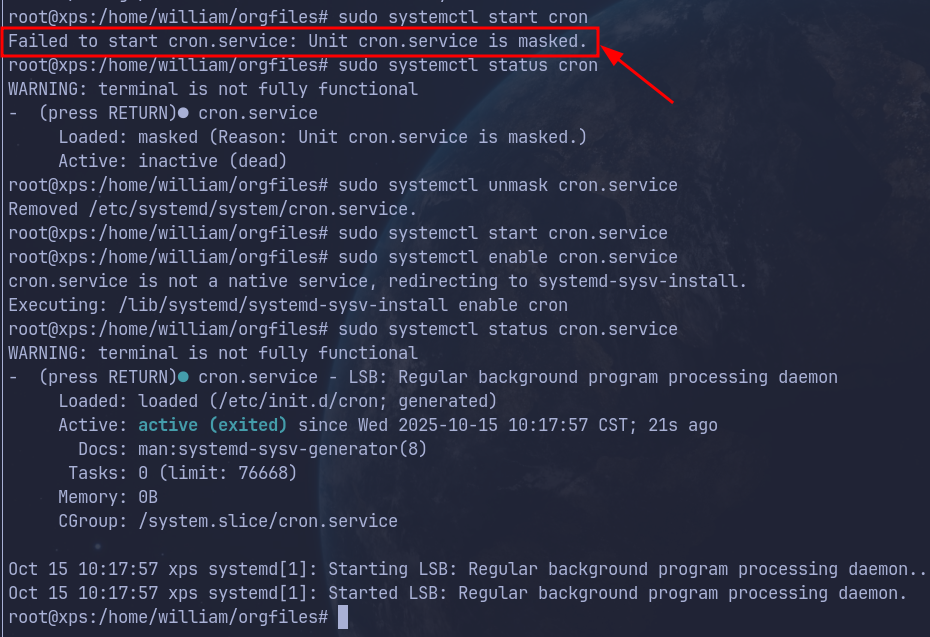
查看状态

1
2
sudo systemctl start cron
Failed to start cron.service: Unit cron.service is masked.

This error means that the cron service has been intentionally disabled (“masked”) on your system. When a service is masked, it cannot be started, even manually.

Docker 修改 DNS:resolv.conf

为了在 Docker 中使用指定 DNS,我们需要相应修改 /etc/resolv.conf。现在遇到的问题是

无法在 Dockerfile 里“永久”覆盖 /etc/resolv.conf; 无论 Classic 还是 BuildKit,Docker 都会在启动阶段把运行时生成的 resolv.conf 挂到容器里,覆盖镜像中原有内容。

因此,我们需要在 build 阶段,把 DNS 「传送」到 docker 里面。下面介绍具体的方法。

0%