
Screen capture on a LAN web app needs https, and macOS refuses a lazy self-signed certificate
 william 收录于 Tools
My team’s internal portal runs on plain http on the LAN, at http://192.168.1.82:8888. I wanted its
note editor to grab a screenshot of another window straight from the browser, Flameshot-style, with
getDisplayMedia(). On that address the API isn’t there at all: browsers only offer screen capture
in a secure context, and an http page on a LAN IP is not one.
The fix is https next to http, with a certificate signed by a small local CA that each computer trusts
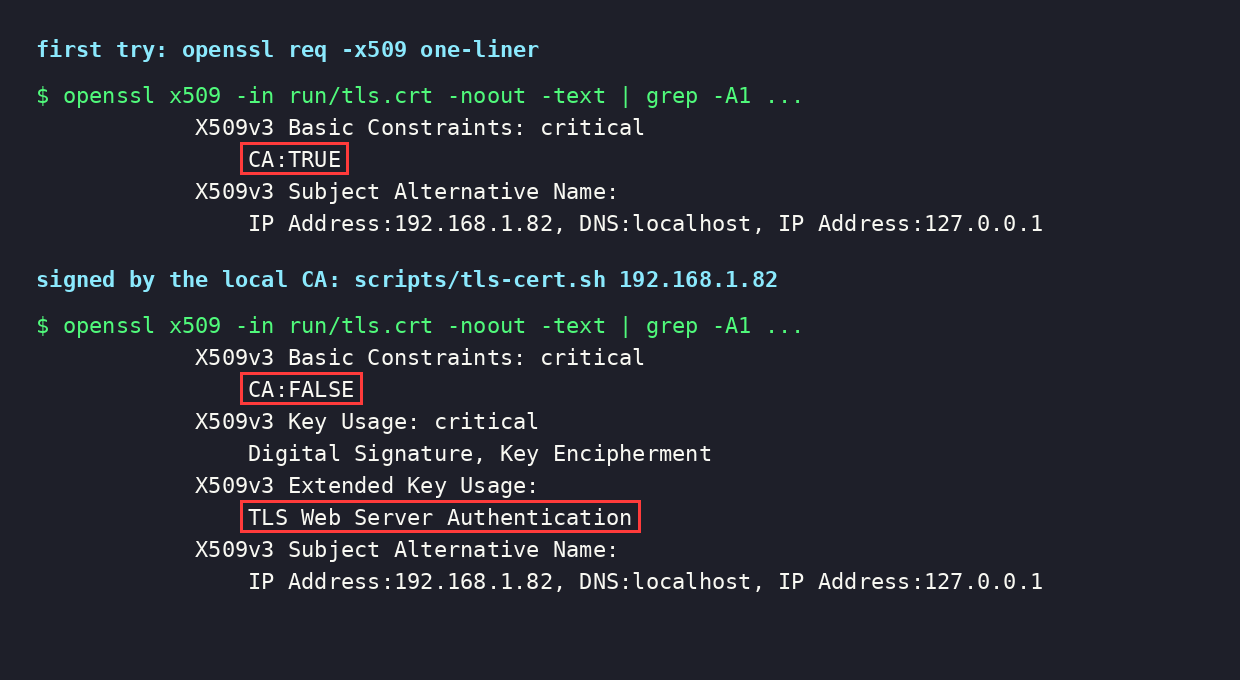
once. My first attempt, the usual one-line self-signed openssl req -x509, made the wrong kind of
certificate: a CA certificate with no serverAuth usage, which Apple’s rules reject.
The wall: no secure context, no getDisplayMedia
MDN is blunt about both conditions on
getDisplayMedia():
|
|
And secure contexts are
https, 127.0.0.0/8, ::1 and localhost. A LAN IP over http matches none of them. That is also why
the feature worked when I tested on 127.0.0.1 and did nothing on the real address: loopback counts
as secure, the LAN IP doesn’t.
I checked the http case from a headless Chrome (more on how below). isSecureContext was false and
navigator.mediaDevices?.getDisplayMedia was missing:
|
|
Other ways around it, and why I didn’t take them:
- Chrome’s
--unsafely-treat-insecure-origin-as-secure=http://192.168.1.82:8888flag works, but every colleague would have to set it in every browser. - An SSH tunnel to
localhostworks for me and nobody else.
So: serve https.
https beside http in Tornado
The portal is one Tornado process. I kept http on its port, untouched. Scripts and bookmarks use it, so there’s no redirect and no HSTS. Three new options, off by default:
local.conf (this machine):
|
|
The usual 8443 was already taken here by something else:
|
|
|
|
snailportal/__main__.py builds the TLS context once, before anything else starts, so a bad file stops
startup with the reason instead of failing on the first request:
|
|
and listens twice with the same app:
|
|
|
|
Nothing else on the server changed. The cookies have no secure flag, so they work on both. The
page’s WebSocket already picked its scheme from the page:
|
|
First try: the one-line self-signed certificate
This is the line everyone copies, with the IP in subjectAltName because Chrome ignores the common
name:
|
|
It serves, and any browser shows the “not private” warning as expected:
|
|
Then I looked at what it actually is:
|
|
|
|
req -x509 with the default config makes a CA certificate, and there is no key usage or extended
key usage at all. Apple’s
Requirements for trusted certificates in iOS 13 and macOS 10.15
say a TLS server certificate must have the id-kp-serverAuth extended key usage, must be valid for
825 days or fewer, and must carry the name in subjectAltName, and that “connections to TLS servers
violating these new requirements will fail”. I didn’t get to watch it fail on a Mac, but a
certificate that breaks a documented rule isn’t worth shipping to find out.
A local CA that can only vouch for this address
What mkcert does, in a dozen lines of openssl. A CA made once, and a server certificate it signs, the right shape for a server. Computers trust the CA once. The server certificate can be renewed as often as needed without anyone importing anything again.
scripts/tls-cert.sh:
|
|
|
|
|
|
Same grep on the new server certificate: it now has what Apple asks for.
|
|
And the CA is fenced in:
|
|
A few details that matter:
nameConstraintsis the reason this is safe to hand out. Asking colleagues to trust a root CA normally means trusting its key for every site on the internet. This one can only sign for192.168.1.82,127.0.0.1andlocalhost, so even a stolentls-ca.keycan’t forge a bank’s certificate on a client that enforces the constraint.- I left
nameConstraintsnon-critical. A client that understands it enforces it either way; marking it critical only makes a client that doesn’t understand it reject the whole CA. - The CA lives ten years. The server certificate gets 825 days, the macOS limit. Rerunning the script keeps the CA and replaces only the server certificate.
umask 077makes both keys-rw-------. Only the two.crtfiles are opened up to 644.run/is git-ignored.
Check it the way a browser will
curl with the CA as its only trust root verifies the chain, the IP against subjectAltName and the
CA’s name constraints. That is what a browser does once the CA is trusted:
|
|
|
|
Without it, against the system store, it refuses (exit 60 is “peer certificate cannot be authenticated”):
|
|
|
|
(--noproxy '*' because this machine has a proxy in its environment that answers LAN addresses with a
503.)
Trust the CA once per computer
Copy run/tls-ca.crt to the computer (it’s public; only the .key files are secret), then:
- macOS (Chrome and Safari): double-click the file to add it to Keychain Access, open “SnailPortal local CA”, Trust, set “When using this certificate” to Always Trust, close and enter your password.
- Windows (Chrome, Edge): double-click, Install Certificate, Current User, place it in Trusted Root Certification Authorities.
- Firefox (its own store, on every OS): Settings, Privacy & Security, Certificates, View Certificates, Authorities, Import, tick “Trust this CA to identify websites”.
- Chrome on Linux: Settings, Privacy and security, Security, Manage certificates, Authorities, Import, tick “Trust for identifying websites”.
Restart the browser. To make sure the file that arrived is the one you made, compare fingerprints:
|
|
The browser side
With a secure context, the capture itself is short. Two things are easy to get wrong.
Call it inside the click. getDisplayMedia() needs transient user activation, so the editor’s
Screenshot button opens the dialog and calls capture in the same click handler, before any await
that could outlive the gesture. The browser’s window/screen picker comes up straight away.
Wait for a real frame. A window capture’s first frame can still be blank when play() resolves:
|
|
selfBrowserSurface: "exclude" keeps the portal’s own tab out of the picker. Stopping every track
right after the grab ends the share, so the capture lasts only as long as one frame takes.
On the http address the dialog can’t capture, so it says why and links to the same page on https
(https://<host>:<ssl_port><path>), opened in a new tab so an unsaved note stays where it is.
One cost of the https address: an http:// picture or embedded page inside a note is mixed content
there and won’t load. The http address still shows it.
Testing it headless
Three Chrome tricks made this testable without a desktop:
|
|
--use-fake-ui-for-media-stream --use-fake-device-for-media-streamanswer the picker and hand back Chrome’s fake 800×600 video. A real tab or screen source doesn’t start headless (NotReadableError: Could not start video source), so this tests the code path, not a real window.127.0.0.1is a secure context, so a test portal on loopback can never show the http behaviour.--host-resolver-rulesgives it a name that isn’t loopback:http://snailtest.internal:8898is plain http and insecure, while still reaching the local test server.- My first run hung on that name: Chrome sent
snailtest.internalto the proxy in the environment, which had never heard of it.--no-proxy-serverfixed it.
|
|
With those, against a test instance on http 8898 and https 8453:
|
|
What this doesn’t cover: a capture of a real window, importing the CA on a real Mac, and whether port 8889 gets through to other machines on the LAN.
Takeaways
getDisplayMedia()needs a secure context. https, or loopback. A LAN IP over http is neither, which is why “it works on localhost” means nothing here.- Add https; keep http. A second
listen()with anSSLContext, no redirect. WebSockets that followlocation.protocolneed no change. - The one-line
openssl req -x509makes a CA certificate. A server certificate wantsCA:FALSE,extendedKeyUsage=serverAuth, the name insubjectAltName, and 825 days or fewer for Apple. - Use a local CA with
nameConstraints. Trust it once per computer, renew the server certificate freely, and nobody is trusting a key that could sign for other sites. - Test the insecure branch through a hostname.
127.0.0.1is secure by definition;--host-resolver-rulesgives you an insecure name for the same server.
References
相关内容
 支付宝
 微信